

Description
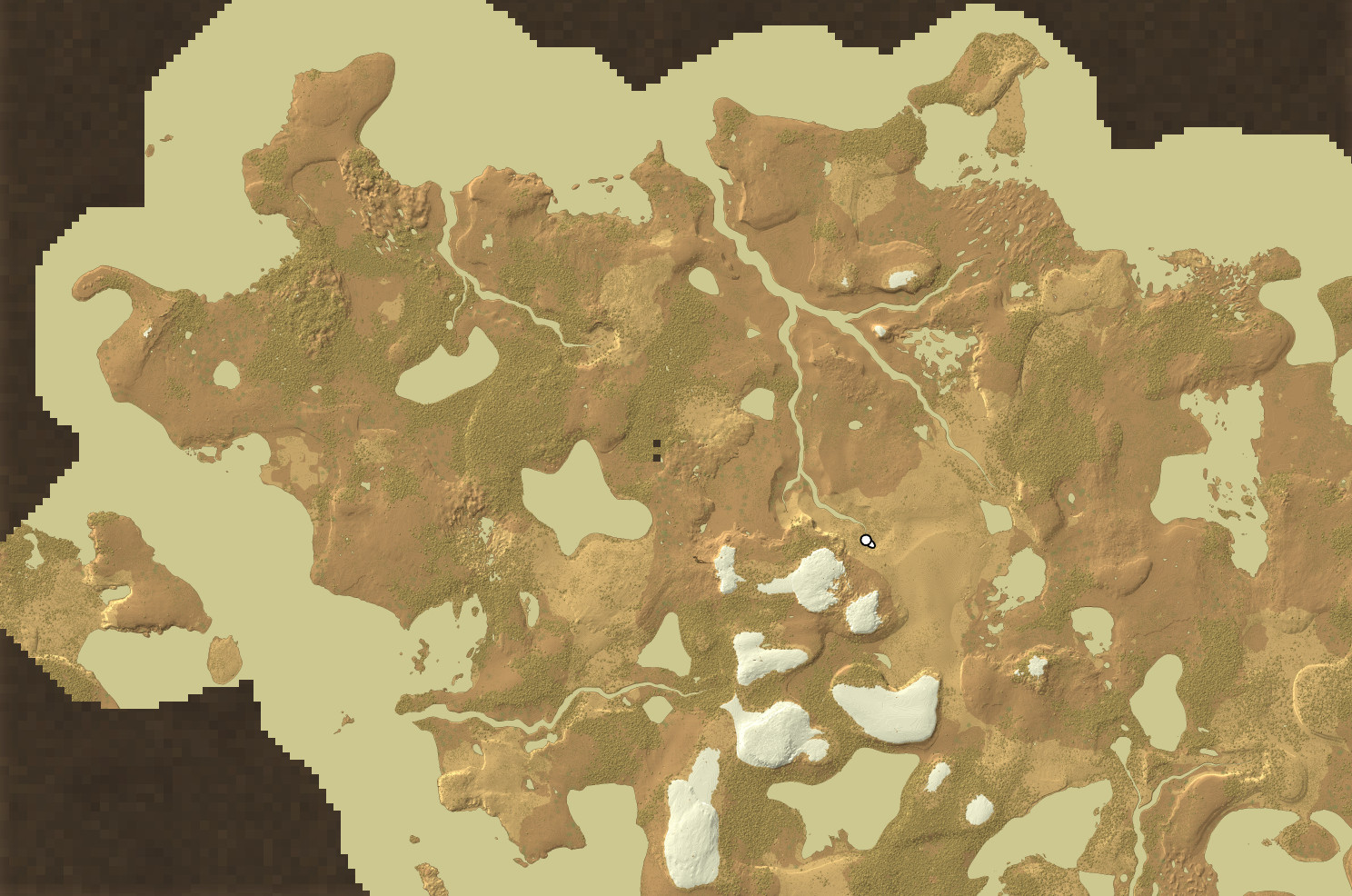
The map screenshot above was taken with the the following additional mods:
This is a tiny mod that will inject a custom ocean map generator into the game.
The new generator uses voronoi noise (also known as cellular or "Worley" noise) to give landmasses very nice and coherent shapes. It does so by using the voroni "seed points" directly and assigning them to be either landmass or ocean, at a threshold dependent on your landcover setting. The resulting landmasses are then heavily distorted with FBM noise make them less boring :)
This technique excels at cleanly seperating continents from each other, and also works very well for story locations, as for each location it will mark the nearest voronoi seed point as land, making sure an entire well-sized continent is generated at each location. This includes the spawn point - no more spawning on a tiny island!
Landforms are not affected at all, so you can use this with any world generation mods you like. "Rivers" also works very well as a companion mod.
Configuring
v1.1.0 adds a configuration file! Here is a brief description of what each value does.
- ExtraLandcoverScale (default 2.0): A scale muliplier that's applied on top of landcover scale. Use for extreme continent sizes or to fine-tune.
- CellularJitter (default 0.43701595): Adjusts the "jitter" of the voronoi noise. Lower = more square-y continents. Actually, setting this to zero makes it act very close to the vanilla landcover noise.
- ContinentWarpOctaves (default 5): Number of noise layers/octaves in a noise that warps the continent shapes.
- ContinentWarpScale (default 4.0): Scale of the warping noise compared to landcover scale.
- ContinentWarpPersistence (default 0.75): How much of the strength should be kept each noise octave.
- ContinentWarpPower (default 2.0): How much the warping noise actually warps the underlying cellular noise.
- IslandThreshold (default 1.0): The islands noise needs to go higher than this value to produce islands, so 1.0 means no islands and 0.0 means way too many. 0.8 is a good value
- IslandNoiseOctaves (default 5): Number of noise layers/octaves in the islands noise.
- IslandNoiseScale (default 2.0: Scale of the islands noise compared to landcover scale.
- IslandNoisePersistence (default 0.9): How much of the strength should be kept each noise octave.
- IslandScale (default 2.0): Scale of the islands noise. This one is not tied to landcover scale, so the islands will be of the same size no matter what landcover scale you use, their scale is only affected by this option.
...Obviously, getting real-time feedback on such changes would be preferred, but afaik there's no way to do that in-game. If you know a bit of C#, however, you can use the little tool I bundled in the source code, just run the ContinentalWorldTest project after adjusting the config in this file: ContinentalWorldTest/Program.cs. It will generate a bitmap picture showing your config changes. u
Recommended world generation settings
Landcover: 30% is good for an earth-like land-to-ocean ratio. Go a bit higher if you want more land and less ocean. At above 50% landcover, you will have more land than ocean, and at that point is it really an ocean or just giant lakes?
Landcover scale: 100% is tuned to give reasonably sized oceans so you won't have to sail for days to reach new continents. At this setting each landmass/ocean "tile" is about 1000-1500 blocks in size on each axis. If you prefer more a realistic scale, 200% to 400% is ideal.
If you're using the rivers mod, the default settings work fine. You can also use my customized rivers config, it tunes the rivers to be a bit more wobbly, removes boulders and river tunnels, and a few other things. of course this is only personal preference. Note that the "landScaleMultiplier" setting in Rivers has no effect when also using my mod.
"disableFlow": false,
"minForkAngle": 15,
"forkVariation": 35,
"normalAngle": 20,
"valleyStrengthMax": 1.2,
"valleyStrengthMin": 0.8,
"noiseExpansion": 1.25,
"riverPaddingBlocks": 256,
"landScaleMultiplier": 1.0,
"minSize": 14.0,
"maxSize": 50.0,
"minNodes": 8,
"maxNodes": 20,
"riverGrowth": 3.0,
"downhillError": 1,
"minLength": 150,
"lengthVariation": 200,
"zoneSize": 256,
"zonesInRegion": 128,
"riverSpawnChance": 0.2,
"riverSplitChance": 0.35,
"lakeChance": 0.15,
"segmentsInRiver": 3,
"segmentOffset": 40.0,
"baseDepth": 0.1,
"riverDepth": 0.022,
"heightBoost": 8,
"topFactor": 1.0,
"riverOctaves": 2,
"riverFrequency": 0.005,
"riverLacunarity": 3.0,
"riverGain": 0.3,
"riverDistortionStrength": 20,
"riverSpeed": 0.5,
"maxValleyWidth": 75.0,
"oceanThreshold": 30.0,
"fixGravityBlocks": true,
"boulders": false,
"gravelBeaches": true,
"RegionSize": 32768,
"ChunksInRegion": 1024,
"ChunksInZone": 8
}
Download
No download link is available for this entry right now.
Ratings & reviews
Sign in to leave a rating or comment.



