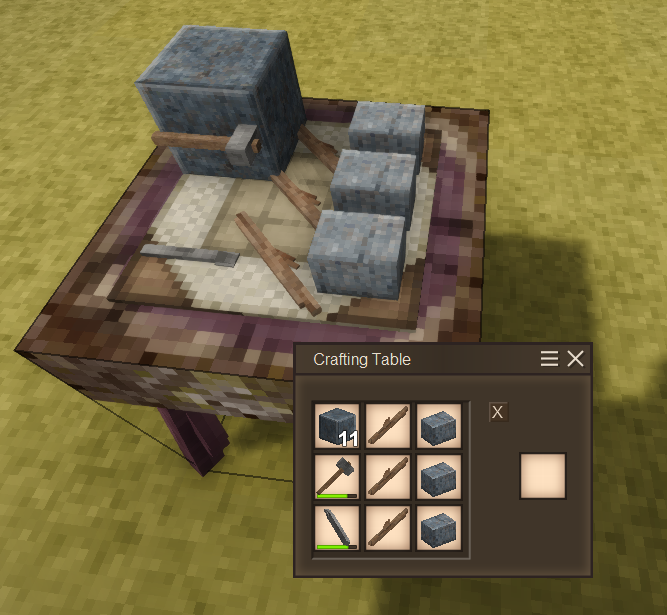
About Crafting Table
From Vintage Story ModDBA table to craft, keeps items if you close the UI.
I wanted to work on a project that forced me to learn how to do GUI's, Block Entities, custom inventories, etc so here's a Crafting Table!
It keeps items in it's grid if you walk away or even exit the game.
Has a little X to clear the grid and give you the items in there.
Comes in a basic version that takes 4 sticks and a log of any wood.
Or an 'advanced' version that takes basalt and a few different metal ingots.
Create your own table by using the Class and BlockEntity from my JSON's into your own custom table. Currently item placement ON the table is coded to be one voxel under the 1.0 block size. (0.9375 of a block height).
This is an early version so I can further tweak and update the features as time goes on.
One thing it doesn't do, and I spent many many hours trying to figure it out, is allow you to click+drag an item stack across the grid slots to place/spread items. If someone knows HOW to enable that, or what I did wrong in my code I would gladly fix it ASAP.
I learned a LOT from this process, and while many might say this isn't needed, I wanted something simple to learn the API.
One "bug" with the tiny items on the table is if they are modeled wrong in the model editor (ie they float in there) they will float on the table. I decided to not care about this.
Source code and issue links are active now.
Highlights
From source dataGame versions
Built for Vintage Story 1.16.5.
Footprint
Rated a light load on a server.
Crafting Table on Nxeon
From our catalogue- One-click install
- Supported on Nxeon Vintage Story servers. We download it from Vintage Story ModDB, place it, and restart the server.
- Server side
- Required on the server
- Server load
- light
- Smallest plan we suggest
- Vintage Story — 1 GB (1 GB RAM). This follows our own load rating above, not a benchmark.
Run Crafting Table on a Vintage Story server
Pick a server or deploy a new one above; it is installed in one click.
What kind of mod it is
From the catalogWeapons, items & crafting
New weapons, gear, items and the recipes to make them.
Runs on your server
From source side supportVintage Story ModDB lists Crafting Table as required on the server. Check its Vintage Story ModDB page to see whether players need it too.
Compatibility
- Game
- Vintage Story
- Runs on
- Serverrequired on the server
- Game versions
- 1.16.5
Verified at the source
- ✓Vintage Story ModDBOfficial listing, checked 2026-09-24Open ↗
- ✓AuthorBuggi, as published on Vintage Story ModDB
- ✓LicenseNot published by the sourceFree