
About Storage Urn
From Vintage Story ModDBA ceramic crate, or let's call it an urn, with food spoilage bonuses
As I moved into middle game and started to harvest multiple stacks worth of the same produce, I started wanting to store them in crates. Crates are a great way to organize storage when you have large amounts of the same item, and as a bonus you can take off the lid and know what you have at a glance.
The problem with storing food in crates is that you lose the nice spoilage bonus that comes with the storage vessel. Food Shelves is the gold standard for food storage, and it has items for some different food types that provide spoilage bonuses, but that's really too much for my Vanilla+ game. What I really wanted was one thing -- a crate that was also a storage vessel. It didn't look like anyone had made this, so I did.
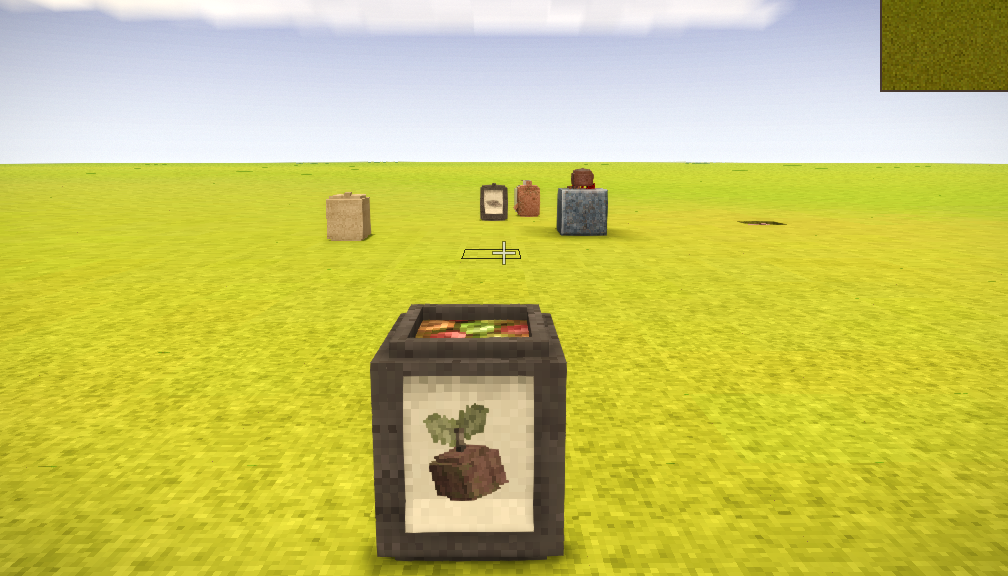
This is a ceramic storage item that stores like a crate and has physics like a storage vessel, e.g. it has gravity and must be placed on a surface. It has the same spoilage bonuses as a storage vessel, and I added the vegetable bonus to fruit as well. There was an unused inContainerTexture for apples just hanging out in the vanilla assets, so I enabled that and added ones for the other two apple colors, most berries, and mangos. (Not every kind of fruit, just the ones I could make before I got tired of making them.) Now you can have an apple "barrel" if you want.
It is Dana Tweaks compatible for adding/removing the lid and adding parchment labels. I don't know how anyone deals with crates without DanaTweaks. It has a clayforming recipe and supports all the beehive kiln ceramic colors. Tooltip text shows the freshness status of whatever is inside.
As of version 2.1.0: Freshness is averaged across the entire contents of the urn as if it were a single stack. Since you can't retrieve the contents of a specific stack from a crate, this is the behavior I thought the crate already had when I built this mod.
Highlights
From source dataGame versions
Built for Vintage Story 1.21.0.
Footprint
Rated a light load on a server.
Storage Urn on Nxeon
From our catalogue- One-click install
- Supported on Nxeon Vintage Story servers. We download it from Vintage Story ModDB, place it, and restart the server.
- Server side
- Required on the server
- Server load
- light
- Smallest plan we suggest
- Vintage Story — 1 GB (1 GB RAM). This follows our own load rating above, not a benchmark.
Run Storage Urn on a Vintage Story server
Pick a server or deploy a new one above; it is installed in one click.
What kind of mod it is
From the catalogBuilding & decoration
Blocks, furniture, decorations and building tools.
Runs on your server
From source side supportVintage Story ModDB lists Storage Urn as required on the server. Check its Vintage Story ModDB page to see whether players need it too.
Compatibility
- Game
- Vintage Story
- Runs on
- Serverrequired on the server
- Game versions
- 1.21.0
Verified at the source
- ✓Vintage Story ModDBOfficial listing, checked 2026-09-24
- ✓AuthorEchoweaver, as published on Vintage Story ModDB
- ✓LicenseNot published by the sourceFree