About Packrat
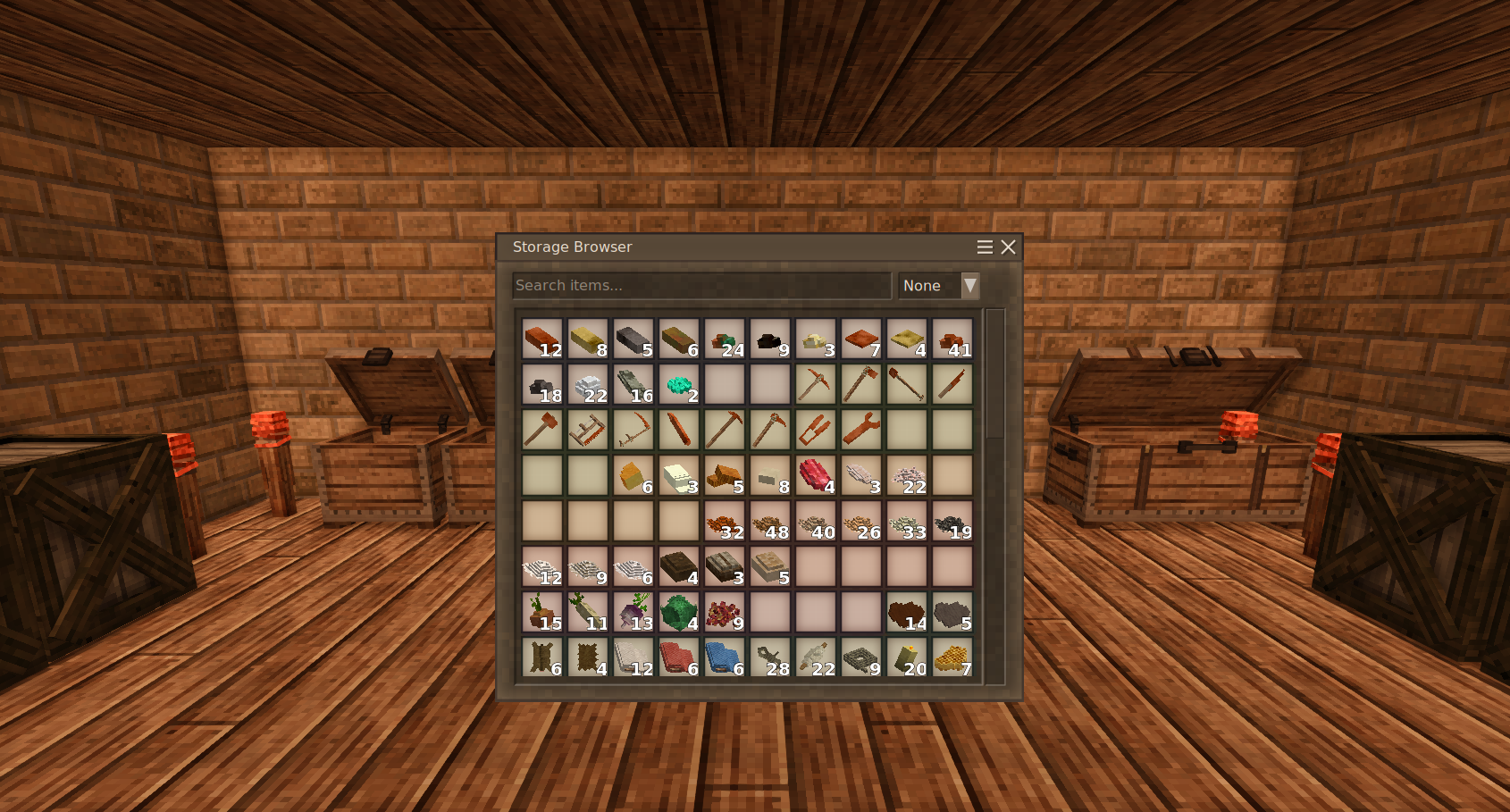
From Vintage Story ModDBUnified Storage Browser showing the contents of all chests and crates within reach
Packrat adds a Storage Browser that lets you view and search the contents of all nearby containers at once - perfect for the compulsive hoarder in all of us.
What is a Pack Rat?
The term "pack rat" comes from the North American woodrat, famous for collecting and storing an eclectic variety of objects in its nest. Like its namesake, any dedicated Vintage Story player
eventually accumulates room after room of carefully organized (or not-so-carefully organized) supplies. Packrat helps you find what you need without opening every chest.
Features
- One-key browsing - Press R to open a unified view of all containers within 5 blocks
- Room detection - In an enclosed room, opens everything regardless of line-of-sight; in open areas, requires visibility to each container
- Container highlighting - Each container's slots are color-coded so you always know which chest or crate holds what
- Search & filter - Type to filter by item name, block material (stone, wood, metal), or food category (protein, grain, vegetable); non-matching items are dimmed
- Smart transfers - Shift-click prioritizes crates with matching items, then empty crates, then chests
- Crate awareness - Respects single-item-type restrictions; shows ghost items in empty crate slots
How to Use
1. Build a storage room with chests and/or crates
2. Press R (rebindable in controls) while standing inside
3. Browse the unified grid - colored backgrounds indicate different containers
5. Click or shift-click to move items as usual
The browser respects reinforced and locked containers - if you can't open it normally, Packrat won't open it either.
Highlights
From source dataGame versions
Built for Vintage Story 1.21.5.
Footprint
Rated a light load on a server.
Packrat on Nxeon
From our catalogue- One-click install
- Supported on Nxeon Vintage Story servers. We download it from Vintage Story ModDB, place it, and restart the server.
- Server side
- Required on the server
- Server load
- light
- Smallest plan we suggest
- Vintage Story — 1 GB (1 GB RAM). This follows our own load rating above, not a benchmark.
Run Packrat on a Vintage Story server
Pick a server or deploy a new one above; it is installed in one click.
What kind of mod it is
From the catalogBuilding & decoration
Blocks, furniture, decorations and building tools.
Runs on your server
From source side supportVintage Story ModDB lists Packrat as required on the server. Check its Vintage Story ModDB page to see whether players need it too.
Compatibility
- Game
- Vintage Story
- Runs on
- Serverrequired on the server
- Game versions
- 1.21.5
Verified at the source
- ✓Vintage Story ModDBOfficial listing, checked 2026-09-24
- ✓Authordizzyd, as published on Vintage Story ModDB
- ✓LicenseNot published by the sourceFree