Storage Tweaks
Adds compact/sort and quick-unload buttons to chests and inventory.
Description
A small quality of life mod that makes managing storage and inventory a bit easier with basically four features
Sort & Compact
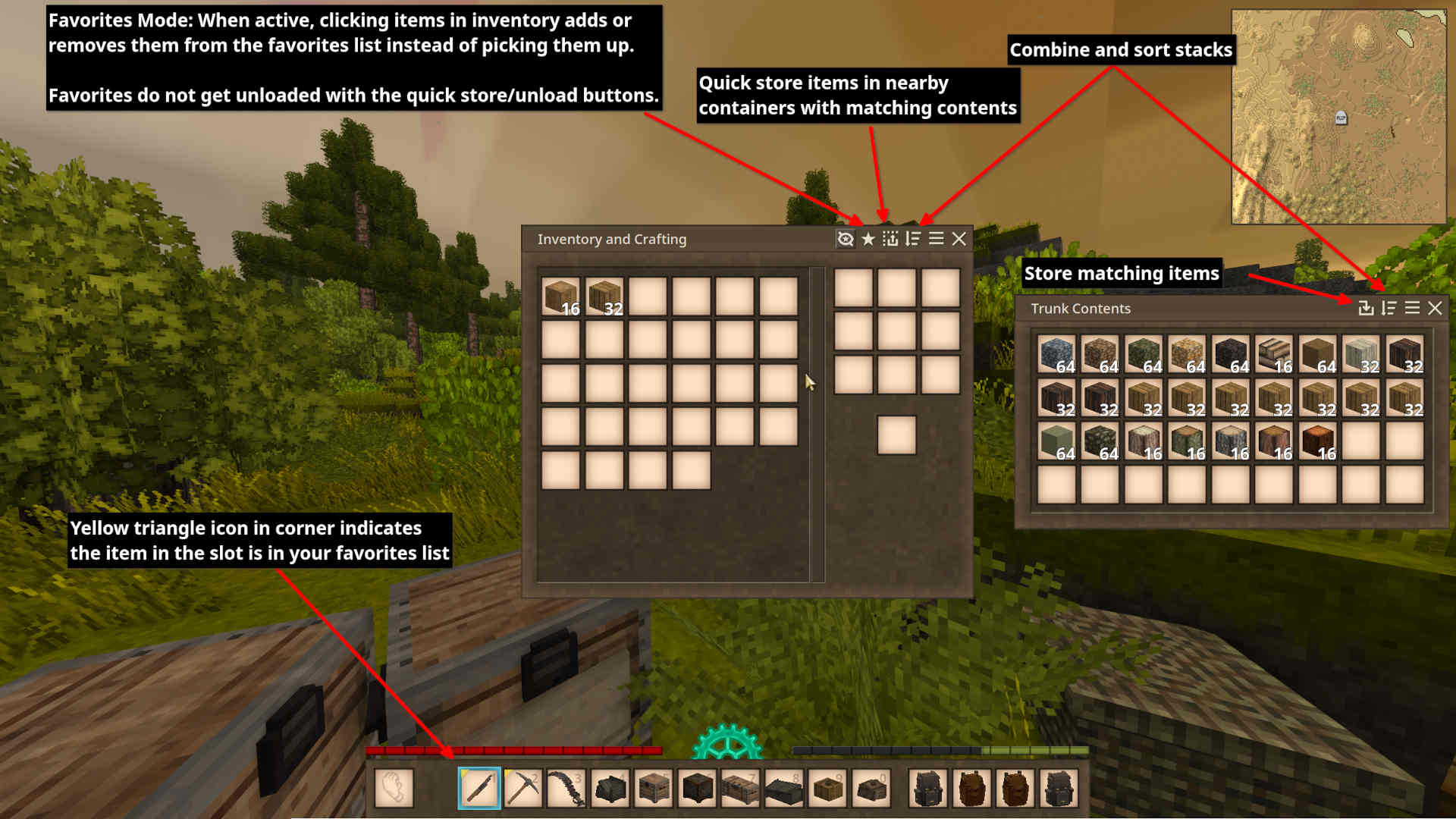
The sort button combines stacks if possibe and sorts items in the chest by class and code. This functionality is also available in the player inventory but doesn't touch the hotbar.
Quick Store
The quick store button moves matching items from your inventory into the chest.
Quick Store Nearby
The store nearby button in your inventory move items into nearby containers with matching contents.
Favorites
Favorites do not get unloaded with the quick unload/store buttons.
List of items added to favorites list when mod is first loaded
knife
pickaxe
pie
tongs
arrow
bow
bowl
cleaver
cookingpot
crock
falx
hammer
hoe
lantern
saw
scythe
shears
shield
shovel
spear
sword
torch
Config
Configuration is optional and I strive to make the defaults good but configuration is available regardless
The following options are available
HideFavorites- Default:
false - Hides the yellow corner of slots that contain favorited items.
- While the favoriting mode is active in the inventory the yellow corner will be visible regardless of what this option is set to.
- Default:
StackPerishables- Default:
false - You can also toggle this option in the titlebar of the player inventory
- When enabled this option will cause sorting and unload (quick stack) actions to stack items of different spoil rates rather then placing them in their own slots.
- Default:
SortHotbarWithBackpack- Default:
false - When enabled the inventory sort action will also sort none favorited items out of the hotbar.
- Default:
HideSortButton- Default: false
- When enabled hides the sort button in the inventory and chests (useful for those that prefer to only use the hotkeys)
HideStoreNearbyButton- Default:
false - When enabled hides the store nearby button
- Default:
HideStackPerishablesButton- Default:
false - When enabled hides the button in the player inventory titlebar that allows toggling StackPerishables
- Default:
HideQuickStoreButton- Default:
false - When enabled hides the quick store button in container titlebars
- Default:
- SkipFavoritesWhenSorting
- Default: false
- When enabled does not move favorited items in inventory during sort
- Favorited items in your hotbar won't get sorted either way
QuickStoreNearbySearchRadius- Default:
8 - Configures the search radius that quick store nearby will use to find suitable containers for storing matching items
- Default:
AdditionalContainerWhitelist- Default:
[] (empty list) - Adds additional containers for quick store nearby to use if they are not in the built-in whitelist
- Supports wildcard item/block codes to whitelist for quick store nearby
- Consider sharing your whitelist so it can be added to the built-in whitelist of this mod for other users' convenience
- Example <pre>[<span class="pl-s"><span class="pl-pds">"</span>game:chest-*<span class="pl-pds">"</span></span>, <span class="pl-s"><span class="pl-pds">"</span>foodshelves:fruitbasket-normal<span class="pl-pds">"</span></span>]</pre>
- Default:
ContainerBlacklist- Default:
[] - Blacklists containers from being used by quick store nearby. Takes priorty over both the built-in whitelist and the
AdditionalContainerWhitelist
- Default:
Ratings & reviews
Sign in to leave a rating or comment.