
About Temperature Height Tweak
From Vintage Story ModDBMakes temperature decrease with elevation much more gradually at first, then faster at high altitude
A pet peeve of mine has long been walking up a 60-block tall hill and seeing ambient temperature drop by 10°C.
In the vanilla game temperature decreases linearly with elevation by about 0.16°C for each block above sea level. While this makes for nice snow-capped mountains, I feel it's not particularly realistic for hills, ridges and highlands to get so cold so quickly. Realism, of course, is impossible to achieve to begin with in a toybox world of very limited height (not to even get into how local terrain affects temperature, e.g. canyons being cooler than the mesas surrounding them), so here's a compromise solution.
What this does
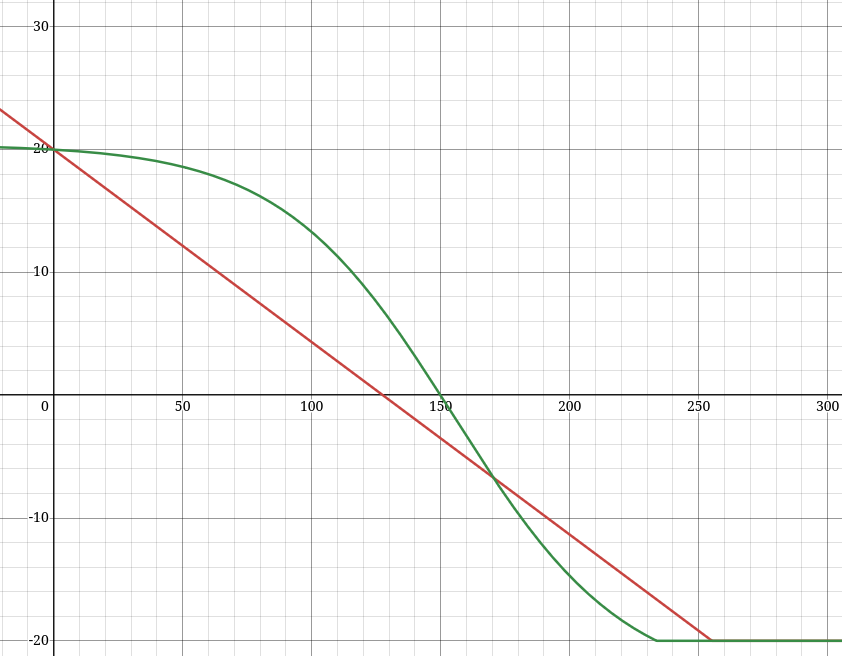
This mod changes the function by which temperature decreases with elevation to follow a sigmoid curve rather than being linear. The temperature decreases very gently at first, then starts decreasing steeply at about 100 blocks above sea level until it intersects the vanilla temperature drop at about 170 blocks above sea level. From there the curve levels back out, but this won't be relevant for most worlds due to world height limitations.
To illustrate:
<table style="border-collapse: collapse; width: 40.5757%; height: 120px;" border="1"> <tbody> <tr style="height: 20px;"> <td style="width: 1.6129%; height: 20px;">Blocks above sea level</td> <td style="width: 1.6129%; height: 20px;">Vanilla temperature</td> <td style="width: 1.6129%; height: 20px;">Modded temperature</td> </tr> <tr style="height: 20px;"> <td style="width: 1.6129%; height: 20px;">0</td> <td style="width: 1.6129%; height: 20px;">20°C</td> <td style="width: 1.6129%; height: 20px;">20°C</td> </tr> <tr style="height: 20px;"> <td style="width: 1.6129%; height: 20px;">50</td> <td style="width: 1.6129%; height: 20px;">12.2°C</td> <td style="width: 1.6129%; height: 20px;">18.6°C</td> </tr> <tr style="height: 20px;"> <td style="width: 1.6129%; height: 20px;">100</td> <td style="width: 1.6129%; height: 20px;">4.3°C</td> <td style="width: 1.6129%; height: 20px;">13.3°C</td> </tr> <tr style="height: 20px;"> <td style="width: 1.6129%; height: 20px;">150</td> <td style="width: 1.6129%; height: 20px;">-3.5°C</td> <td style="width: 1.6129%; height: 20px;">0°C</td> </tr> <tr style="height: 20px;"> <td style="width: 1.6129%; height: 20px;">170</td> <td style="width: 1.6129%; height: 20px;">-6.7°C</td> <td style="width: 1.6129%; height: 20px;">-6.7°C</td> </tr> <tr> <td style="width: 1.6129%;">200</td> <td style="width: 1.6129%;">-11.4°C</td> <td style="width: 1.6129%;">-14.7°C</td> </tr> </tbody> </table>Below sea level this mod uses the standard linear function.
Or see this calculator or the mod screenshot: https://www.desmos.com/calculator/tlizehxfmy (in this calculator, the variable U controls the ambient base temperature)
New world recommended
While this mod can be dropped into an existing world, certain terrain features such as snow and glaciers on mountaintops will not update to reflect the changes in existing chunks.
The numbers in this mod are tuned for a world height of 320. It will work with other world heights, but shorter worlds will be warmer at peak elevation while taller worlds will be colder. This same limitation applies to the vanilla system though.
Configuration (changing the curve)
To configure the mod, run the game with it once and then edit TemperatureHeightTweak.json (or create it with the following content):
<pre class="language-json">{ "a": 188.0, "b": 0.03, "c": 155.0 } </pre> These values correspond to the variables in the equation y = a / (1 + exp(-b(x - c))) - a / (1 + exp(bc))

Use this calculator (or any other graphing calculator) to adjust the variables until the curve has an acceptable shape. On the calculator the X-axis corresponds to height above sea level (in blocks) and the Y-axis to median temperature (before local climate is taken into account). The default curve is tuned for a world height of 320. Keep in mind that sea level varies by world height — have a look at this wiki page or check the sea level for your world height in-game to figure this out for your world height as you adjust the curve.
Adjusting the variables without using a graphing calculator is an exercise in madness, so don't try it.
Please do share good values you've found in the comments. Here are ones for 448 height shared by FinkThinker:
<pre class="language-json">{ "a": 188.0, "b": 0.027, "c": 170.0 }</pre> Mod compatibility
This should work with pretty much any mod, including worldgen mods. This will only conflict with other mods that pretty much do the exact same thing, as there is no reason to patch the functions this mod patches except to change temperature elevation scaling.
Highlights
From source dataGame versions
Built for Vintage Story 1.20.4.
Footprint
Rated a light load on a server.
Temperature Height Tweak on Nxeon
From our catalogue- One-click install
- Supported on Nxeon Vintage Story servers. We download it from Vintage Story ModDB, place it, and restart the server.
- Server side
- Required on the server
- Server load
- light
- Smallest plan we suggest
- Vintage Story — 1 GB (1 GB RAM). This follows our own load rating above, not a benchmark.
Run Temperature Height Tweak on a Vintage Story server
Pick a server or deploy a new one above; it is installed in one click.
What kind of mod it is
From the catalogWorld generation
Changes or adds to how new terrain, biomes and structures are created.
Runs on your server
From source side supportVintage Story ModDB lists Temperature Height Tweak as required on the server. Check its Vintage Story ModDB page to see whether players need it too.
Compatibility
- Game
- Vintage Story
- Runs on
- Serverrequired on the server
- Game versions
- 1.20.4
Verified at the source
- ✓Vintage Story ModDBOfficial listing, checked 2026-09-24
- ✓AuthorBurneddi, as published on Vintage Story ModDB
- ✓LicenseNot published by the sourceFree