
Description
<span style="color: #e74c3c;">Requires PlaceOnSlabs mod</span>
<span style="color: #609a73;">Never again shall we have to jump around like monkeys just to walk places</span>
<span style="color: #000000;">Description</span>
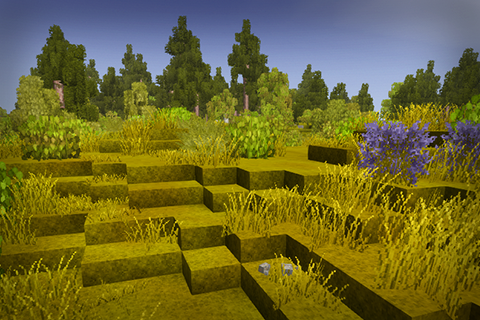
<span style="color: #000000;">This mod adds an additional pass in world generation which smoothes terrain by replacing edge blocks with slab variants. Simple as that.</span>
<span style="color: #000000;">This mod uses PlaceOnSlabs mod, you can place some stuff on slabs and they will be offset, so you don't have to stare at floating grass.</span>
<span style="color: #000000;">Slabs drop regular blocks, so your inventory space won't suffer. You can craft slabs for your landforming desires.</span>
<span style="color: #000000;">Generated structures and story locations are unaffected by this mod to avoid any potential issues</span>
You can choose generation mode:
- <span style="color: #000000;">Column. Default mode. Scans the whole chunk column starting from the surface in order to affect caves. </span>Can be set using <span style="color: #000000;"><span style="text-decoration: underline;">/ts g s Column</span> . Can be manually triggered using </span><span style="color: #000000;"><span style="text-decoration: underline;">/ts s c 500</span> or reverted using <span style="text-decoration: underline;">/ts us c 500</span></span>
- <span style="color: #000000;">Surface. Uses height map to replace blocks. A lot faster than Column, but no caves. </span>Can be set using <span style="color: #000000;"><span style="text-decoration: underline;">/ts g s Surface</span>. </span><span style="color: #000000;">Can be manually triggered using </span><span style="color: #000000;"><span style="text-decoration: underline;">/ts s s 500</span> or reverted using <span style="text-decoration: underline;">/ts us s 500</span></span>
- None. Disables smoothing. Can be set using <span style="color: #000000;"><span style="text-decoration: underline;">/ts g s None</span> </span>
<span style="color: #000000;">I won't add support to ConfigLib until it authors fix its memory leaks. I don't have time to fix them myself right now.</span>
<span style="color: #000000;">Compatibility</span>
<span style="color: #000000;">Should be compatible with most mods that affect world generation (like BetterRuins, Terra Prety, VanillaPlus Worldgen etc)</span>
<span style="color: #000000;">Should be compatible with all mods that add vegetation (Wildgrass, Floral Zones, Wildcraft etc)</span>
<span style="color: #000000;">Can be incompatible with mods that interact with surface blocks (like Trail Mod)</span>
<span style="color: #18a085;">Compatible</span>
- BetterRuins
- Terra Prety: Coastlines & Continents
- Fields and Plateaus
- Plains and Valleys
- Conquest Landform Overhaul
- <a href="https://mods.vintagestory.at/list/mod?sortby=lastReleased&sortdir=d&text=Floral+Zones&side=&a=2ABE1C9265B6B2CFEFAE&mv=&c=&t=">Floral Zones
- Wildgrass
- Wildcraft: Fruits and Nuts
- Wildcraft: Trees and Shrubs
- Under Tangled Boughs
- Geology Additions
- Catch Ledge
- Conquest VS Edition
<span style="color: #2880b9;">Compatible, but require some changes from the player</span>
- Footprints (add "terrainslabs:" to SurfaceMaterials in Footprints-Client.json and Footprints-Server.json configs)
- Trail Mod (install compatibility patch)
<span style="color: #000000;">Existing saves</span>
<span style="color: #000000;">The changes are revertable, so you can try this mod in your existing worlds. I would still recommend to backup your world, though.</span>
<span style="color: #000000;">If you want to smooth your existing chunks, run this command: <span style="text-decoration: underline;">/ts s c 500</span> (range is adjustable). It will update only loaded chunks nearby, so you might want to repeat this command for far/unloaded chunks. <span class="HwtZe" lang="en"><span class="jCAhz ChMk0b"><span class="ryNqvb">I haven't implemented a way</span></span></span> to fully smooth your whole world at once.</span>
<span style="color: #000000;">If you want to remove this mod midsave:</span>
Ratings & reviews
Sign in to leave a rating or comment.



