
VS Chunk Manager
A world management tool for selecting, regenerating and deleting chunks from the map.
Description
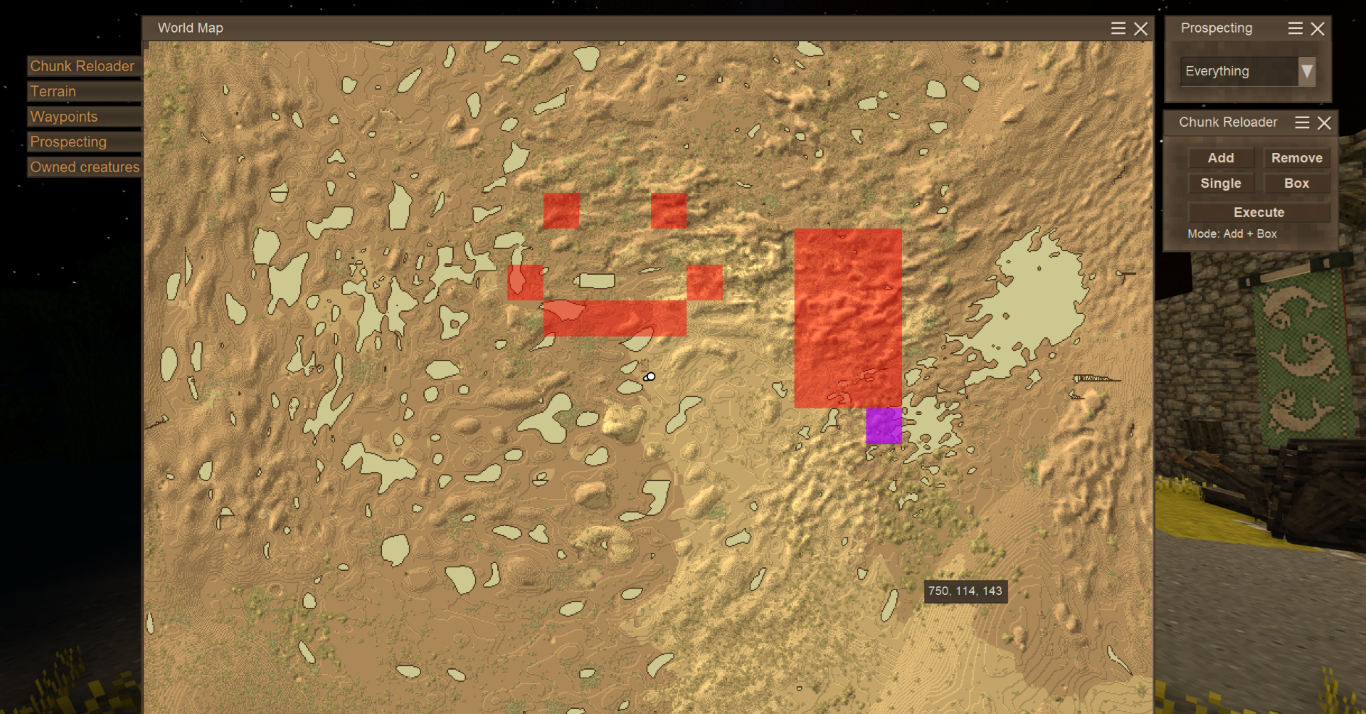
<h1>VS Chunk Manager</h1> <p><strong>VS Chunk Manager</strong> is a client-server utility mod for <em>Vintage Story</em> that provides tools for managing world chunks directly from the world map.</p> <p>Instead of resetting an entire world, you can visually select specific chunks and <strong>regenerate, delete or preload only the areas you want</strong>.</p> <p>It is especially useful when updating to a game version with changed world generation, removing unused areas so they can generate again in the future, repairing terrain, or testing world generation during mod development.</p> <hr /> <h2>Features</h2> <h3>Map-based chunk selection</h3> <p>Select chunks directly from the world map using two selection modes:</p> <ul> <li><strong>Single</strong> – select individual chunks</li> <li><strong>Box</strong> – select an entire rectangular area with two clicks</li> </ul> <p>Selected chunks are highlighted on the map before any changes are made. Chunks can also be added to or removed from the current selection.</p> <h3>Regenerate / Preload</h3> <p>Regenerates the selected chunks using the world's current world generator. If a selected chunk does not exist yet, the mod will generate it, allowing <strong>Regenerate mode to also be used for preloading chunks</strong>.</p> <p>This can be useful for:</p> <ul> <li>Updating areas after a game update</li> <li>Regenerating terrain after changing worldgen mods</li> <li>Repairing broken or corrupted terrain</li> <li>Testing world generation</li> <li>Recreating specific areas without resetting the entire world</li> <li><strong>Preloading unexplored chunks</strong> without having to travel through the area in-game</li> </ul> <p> </p> <p>This means you can use the map selection tools to select a large area and generate its chunks in advance.</p> <p>After regeneration, the player's world map is automatically refreshed to display the newly generated terrain.</p> <h3>Delete</h3> <p>Deletes the selected chunks without immediately regenerating them.</p> <p>Deleted chunks will be generated again normally when players explore the area in the future.</p> <p>Their corresponding map data is also removed, so previously explored terrain is no longer displayed on the player's map.</p> <p>This is particularly useful for cleaning up distant or abandoned explored areas before updating the game or changing world generation.</p> <h3>Database Vacuum</h3> <p>After deleting chunks, the mod provides an option to run Vintage Story's built-in database vacuum operation.</p> <p>Deleting chunks removes their data from the world database, but does not necessarily reduce the physical database file size immediately. Vacuuming compacts the database and reclaims unused space.</p> <p>This is especially useful after deleting large areas of the world.</p> <hr /> <h2>Use cases</h2> <ul> <li>Regenerate terrain after updating Vintage Story</li> <li>Regenerate areas after changing worldgen mods</li> <li>Repair glitched or corrupted terrain</li> <li>Remove distant explored areas before a worldgen update</li> <li>Reduce unnecessary world data</li> <li>Reset specific parts of a world without wiping player progress</li> <li>Test and debug world generation during mod development</li> <li>Preload unexplored chunks without physically visiting the area</li> </ul> <hr /> <h2>Server usage</h2> <p>VS Chunk Manager works in multiplayer, but chunk management operations are restricted to <strong>server admins</strong>.</p> <p>To give a player admin permissions:</p> <pre><code>/op <playername></code></pre> <p>To revoke the admin role:</p> <pre><code>/player <playername> role suplayer</code></pre> <p>This prevents regular players from deleting or regenerating parts of the server world.</p> <hr /> <h2>Important information</h2> <h3>World generation changes</h3> <p>When regenerating old chunks after updating Vintage Story or changing world-generation mods, the newly generated terrain may not perfectly match the surrounding old terrain.</p> <p>Changes to the terrain generator may result in cliffs, cut mountains, different elevations, or other visible borders between old and newly generated chunks.</p> <p>This is expected when the world generator itself has changed.</p> <h3>Back up your world</h3> <p>Chunk deletion and regeneration directly modify world data.</p> <p><strong> Always create a backup of your world before performing large chunk operations. </strong></p> <p>Although VS Chunk Manager is designed to operate only on explicitly selected chunks, world modification tools should always be used carefully.</p> <p><strong> Use at your own risk. The creator is not responsible for world or save damage.</strong></p> <p> </p> <hr /> <h2>Video Showcase</h2> <p>Huge thanks to Thalan_McRom - the creator of the video below for featuring <strong>VS Chunk Manager</strong>!</p> <p>The video does a great job of demonstrating how the mod works in practice, including the chunk selection and regeneration workflow.</p> <p><strong> <a href="https://www.youtube.com/watch?v=f63ShlVjVO0"> Watch the VS Chunk Manager showcase on YouTube </a></strong></p>
Download
No download link is available for this entry right now.
Ratings & reviews
Sign in to leave a rating or comment.



