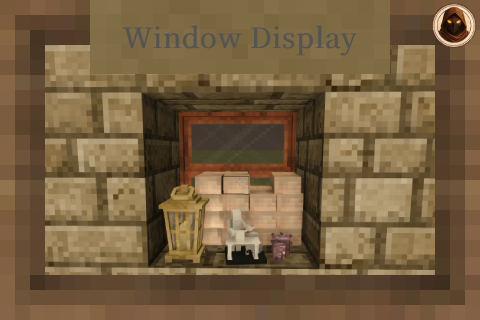
Window Display
Adds Windows, an improved version of the Window Storage mod, uses Universal Display Lib
Description
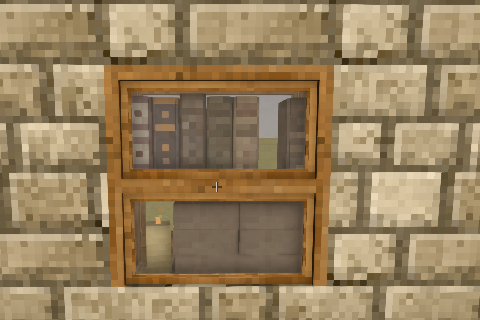
<div style="background-color: #1e1e1e; color: #f0f0f0; font-family: 'Noto Serif HK', Georgia, serif; padding: 20px; line-height: 1.6; max-width: 1000px; margin: 20px auto;"><div style="border-bottom: 3px solid #b5893d; padding-bottom: 20px; margin-bottom: 30px; text-align: center;"><h1 style="color: #b5893d; font-size: 2.5rem; margin: 0 0 10px 0; text-transform: uppercase; letter-spacing: 2px;">Window Display</h1> <p style="color: #b0b0b0; margin: 0 0 12px 0;">A complete overhaul of <strong style="color: #d1a457;">Window Storage</strong> and <strong style="color: #d1a457;">Vanilla Pane Storage</strong></p> <p style="color: #b0b0b0; margin: 0;">Windows you can open, put things on, and mount either way round<br>62 styles across 14 woods and 11 glass colours</p> </div> <div style="background-color: rgba(181, 137, 61, 0.12); border-left: 4px solid #b5893d; padding: 15px; margin: 0 0 25px 0; border-radius: 0 6px 6px 0;"><strong style="color: #b5893d;">New in this version - your windows are now protected from other players.</strong><br><br><strong style="color: #b5893d;">Land claims are respected.</strong> Until now a claim gave a window no protection at all - anyone could stand in your claim and right-click your sills empty. That is fixed, and it covers placing, taking, opening panes and swapping.<br><br><strong style="color: #b5893d;">A chiselled design fitted to a custom window is now permanent.</strong> It cannot be right-clicked out, turned or nudged by anyone. Break the window and it drops, which is how you get it back. Windows already standing in your world are covered too. Only the first design you fit is fixed - anything else you put on that surface still comes off normally.<br><br>Needs <strong>Universal Display Lib 1.1.1</strong>. Update both together.</div> <div style="background-color: rgba(200,90,60,0.12); border-left: 4px solid #c85a3c; padding: 15px; margin: 0 0 25px 0; border-radius: 0 6px 6px 0;"><strong style="color: #e08a63;">Updating from before 1.0.2? Read this first.</strong> The library was renamed - it is now <strong>Universal Display Lib</strong>, and its mod id changed from <code style="background: #2a2a2a; padding: 1px 4px; border-radius: 3px; color: #d1a457;">windowdisplaylib</code> to <code style="background: #2a2a2a; padding: 1px 4px; border-radius: 3px; color: #d1a457;">universaldisplaylib</code>. <strong style="color: #e08a63;">Delete the old <code style="background: #2a2a2a; padding: 1px 4px; border-radius: 3px; color: #d1a457;">windowdisplaylib</code> zip</strong> rather than keeping both, or neither library loads. <strong style="color: #d1a457;">Your worlds are safe either way</strong> - no block codes changed, and placed windows, their contents, pane states and tall stacks all come back exactly as you left them.</div> <div style="background-color: #2a2a2a; border: 1px solid #7a5c28; padding: 20px; margin-bottom: 30px; border-radius: 6px;"> <h2 style="color: #b5893d; margin-top: 40px; margin-bottom: 20px; font-size: 1.5rem; text-transform: uppercase; font-weight: bold; text-decoration: underline;">Required Mods</h2> <p style="color: #b0b0b0; font-size: 0.85rem; text-transform: uppercase; letter-spacing: 1px; margin: 0 0 10px 0;">Required</p> <div style="margin-bottom: 20px;"><a style="display: inline-block; background-color: #3a3a3a; border: 1px solid #b5893d; color: #d1a457; padding: 8px 14px; margin-right: 10px; margin-bottom: 10px; text-decoration: none; font-weight: bold; border-radius: 4px; font-size: 0.95rem;" href="https://mods.vintagestory.at/universaldisplaylib" target="_blank" rel="noopener">Universal Display Lib <span style="color: #b0b0b0; font-weight: normal;">1.1.1+</span></a><a style="display: inline-block; background-color: #3a3a3a; border: 1px solid #b5893d; color: #d1a457; padding: 8px 14px; margin-right: 10px; margin-bottom: 10px; text-decoration: none; font-weight: bold; border-radius: 4px; font-size: 0.95rem;" href="https://mods.vintagestory.at/attributerenderinglibrary" target="_blank" rel="noopener">Attribute Rendering Library <span style="color: #b0b0b0; font-weight: normal;">3.1.0+</span></a></div> <p style="color: #b0b0b0; font-size: 0.85rem; text-transform: uppercase; letter-spacing: 1px; margin: 0 0 10px 0;">Strongly recommended</p> <div style="margin-bottom: 10px;"><a style="display: inline-block; background-color: #3a3a3a; border: 1px solid #7a5c28; color: #d1a457; padding: 8px 14px; margin-right: 10px; margin-bottom: 10px; text-decoration: none; font-weight: bold; border-radius: 4px; font-size: 0.95rem;" href="https://mods.vintagestory.at/windowdisplaypatches" target="_blank" rel="noopener">Window Display Patches</a></div> <p style="color: #b0b0b0; font-size: 0.9rem; margin: 0 0 10px 0;">Patches is what gives candles their flame, sizes a lot of vanilla and modded items properly, and adds the recipes that convert old windows across.</p> <div style="background-color: rgba(181, 137, 61, 0.1); border-left: 4px solid #b5893d; padding: 15px; margin: 15px 0; border-radius: 0 6px 6px 0;"><strong style="color: #b5893d;">Coming from the old mods?</strong> This is a rewrite, not an update. It has its own block codes and installs happily next to <a style="color: #d1a457; text-decoration: none; font-weight: bold;" href="https://mods.vintagestory.at/windowstorage" target="_blank" rel="noopener">Window Storage</a> and <a style="color: #d1a457; text-decoration: none; font-weight: bold;" href="https://mods.vintagestory.at/vanillapanestorage" target="_blank" rel="noopener">Vanilla Pane Storage</a>, so nothing in your world breaks. Install the Patches mod and you can convert old windows one at a time in the crafting grid, keeping their wood and glass - no need to tear anything down.</div> </div> <div style="margin-bottom: 30px;"> <h2 style="color: #b5893d; margin-top: 40px; margin-bottom: 20px; font-size: 1.5rem; text-transform: uppercase; font-weight: bold; text-decoration: underline;">What You Get</h2> <ul style="list-style-type: none; pad
Ratings & reviews
Sign in to leave a rating or comment.