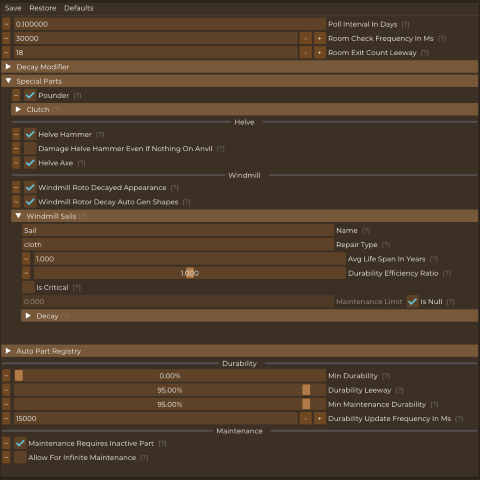
About Auto Config Lib
From Vintage Story ModDBAuto generates ConfigLib implementation for mods that don't add their own
Requires: Config Lib
Ever wanted to edit some setting through ConfigLib's mod setting menu, only to realize the other mod doesn't have a ConfigLib implementation? Well I haven't but I'm here to try and fix this anyway.
Features:
- Automated ConfigLib implementation for Typed Configs (meaning configs that have an actual code class associated with it)
- World Config gets added to ConfigLib automatically as well
- Shows description from code documentation
- Supports data annotation attributes
This required the creator of the mod to enable the output of the documentation file
Suported data annotations:
- DisplayName (sets the name in config)
- Description (sets the description in config)
- Category (sets the group to display this item under)
- DefaultValue (sets the value to use for the reset button)
- ReadOnly (sets whether this value should be editable or just displayed)
- Browsable (sets whether this item should be visible, by default fields & properties are considered browseable(true) while methods are considered browseable(false) and yes changing this will make the method show up as a button in the config)
- Range (sets the minimum and maximum value for numbers, as long as the min or max is not infinite this will also turn it into a slider)
- MaxLength (sets the maximum length of the string field, default MaxLength is 128)
- DisplayFormat (sets the display format, currently only supports "P" for showing floats as percentages where 0 is considered 0% and 1 is considered 100%)
Note for modders: if you want a more complete code first config management (and not just configLib integration) then consider using InsanityLib instead
Highlights
From source dataGame versions
Built for Vintage Story 1.20.0-rc.8.
Footprint
Rated a light load on a server.
Auto Config Lib on Nxeon
From our catalogue- One-click install
- Supported on Nxeon Vintage Story servers. We download it from Vintage Story ModDB, place it, and restart the server.
- Server side
- Required on the server
- Server load
- light
- Smallest plan we suggest
- Vintage Story — 1 GB (1 GB RAM). This follows our own load rating above, not a benchmark.
Run Auto Config Lib on a Vintage Story server
Pick a server or deploy a new one above; it is installed in one click.
What kind of mod it is
From the catalogListed on Vintage Story ModDB as “Utility”
Quality of life & UI
Small conveniences, tweaks and interface improvements players notice straight away.
Runs on your server
From source side supportVintage Story ModDB lists Auto Config Lib as required on the server. Check its Vintage Story ModDB page to see whether players need it too.
Compatibility
- Game
- Vintage Story
- Runs on
- Serverrequired on the server
- Game versions
- 1.20.0-rc.8
Verified at the source
- ✓Vintage Story ModDBOfficial listing, checked 2026-09-24Open ↗
- ✓AuthorTheInsanityGod, as published on Vintage Story ModDB
- ✓LicenseNot published by the sourceFree