
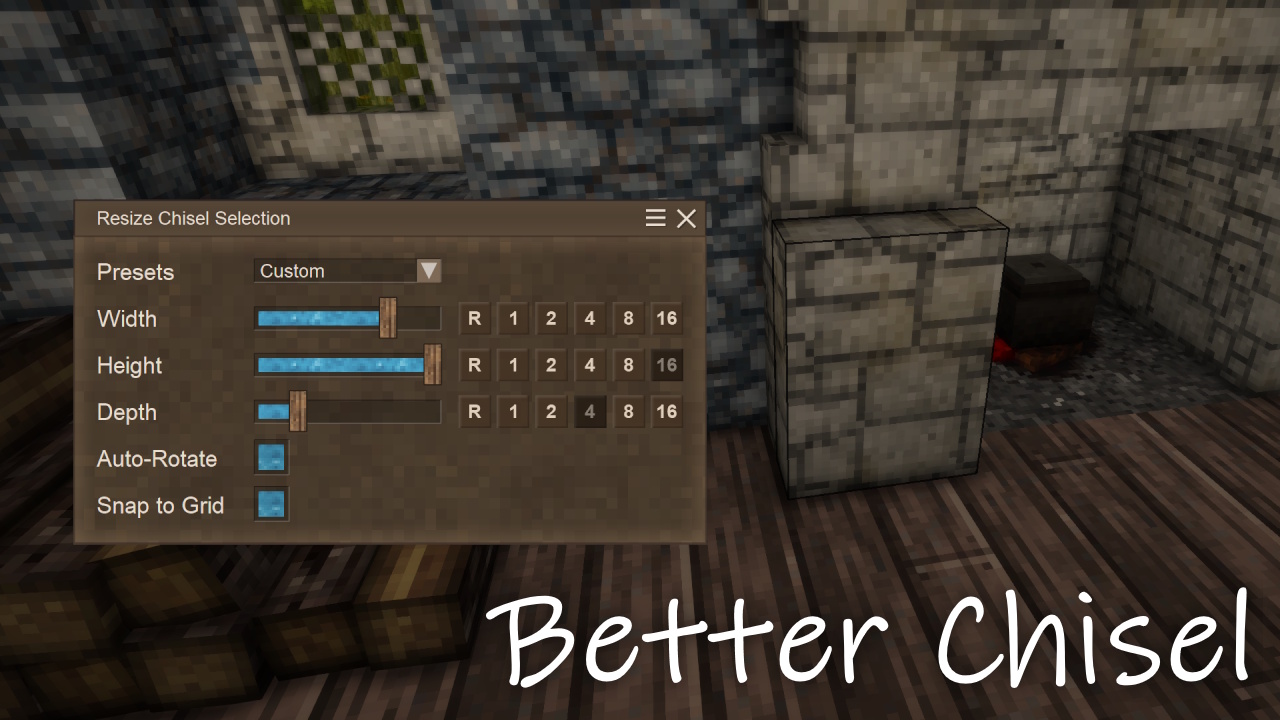
Better Chisel
Chisel to your heart's content with a resizable selection box.
Description
Chisel to your heart's content with a resizable selection box.
A new chisel mode has arrived! Press [R] to open the resize chisel selection menu, which will automatically switch the chisel mode to "Resizable" if you're looking at a chiseled block. This mode can also be selected through the vanilla tool mode menu.
In a future update, user-created presets will be available for more efficient swapping between frequently used selections. By default, the available presets are: Slab, Pillar, Cube, Plane, and Strip.
The R button will rotate your selection around the corresponding axis/dimension. You can also hold [Shift] while clicking a quick-resize button (1, 2, 4, 8, 16) to resize matching axes/dimensions in parallel.
Adding voxels at the desired location can be difficult when "Snap to Grid" is disabled. I'll keep exploring ways to improve this feature.
Finally, a safeguard has been implemented to prevent the chisel from being abused as a near-instant mining tool. Any non-player-placed blocks (i.e., naturally generated blocks) cannot be modified beyond 512 voxels (e.g., 8×8×8) unless they are picked up and placed back down. Blocks must be placed while Better Chisel is present to be recognized as player-placed.
Ratings & reviews
Sign in to leave a rating or comment.



