
Custom Map Regions
Give names to entire areas on your map with user drawn regions!
Description
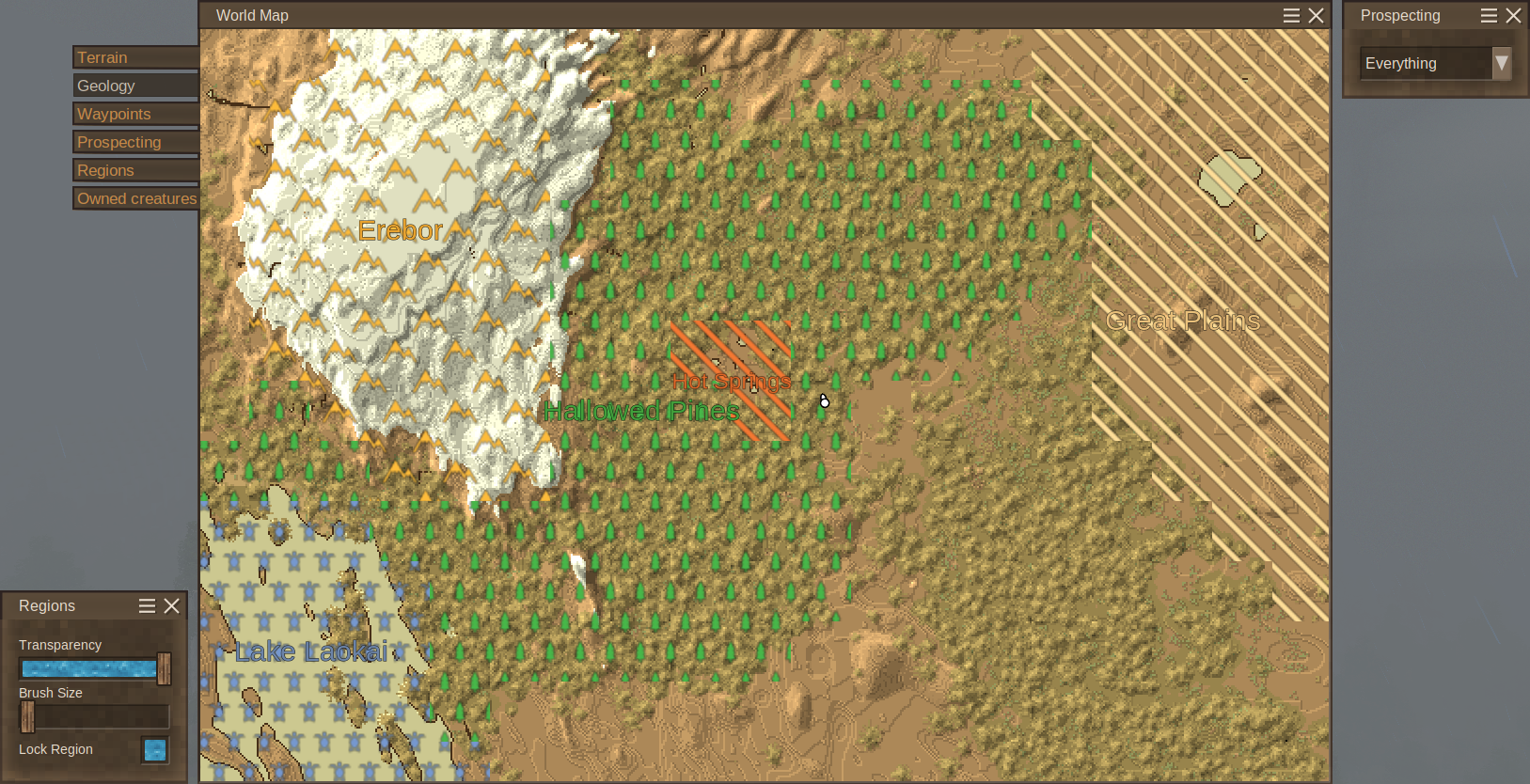
<h2>Do you wanna give a name to that cool valley? Or maybe deliniate the extent of your kingdom?</h2> <p>Then this mod is for you!</p> <p>With this mod you can draw custom regions on the map and give them names! Perfect for explorers that would like to name their newly found vistas!<br />There are <strong>32 different fill patterns for the regions</strong>, and <strong>all the colors that waypoints use</strong>, for you to customize your regions!</p> <p>The mod works <strong>standalone on the client-side, even in servers that don't have the mod</strong>, or <strong>in multiplayer sharing the regions with the server for other players to see</strong>!</p> <h3>Want to use it in multiplayer? Well, now you can!</h3> <p>The mod was made to allow local or server synced play!</p> <ul> <li><strong>Local First</strong> - If the server doesn't have the mod, this mod stores your information locally, allowing you to make your own regions on any server!</li> <li><strong>Server Syncing if available</strong> - If the server has the mod, the server stores the regions and allows every player to contribute to naming the land!<br />Every action is also server authored in this case, meaning that server admins can give or remove privileges related to regions, and even change others players regions, to curtail any abuse that could happen.</li> </ul> <h3>Post development roadmap</h3> <p>This mod's core feature are already in place, but some features are still "good to have's" that might one day be implemented:</p> <ol> <li>Possibility for players to add their own custom fill patterns through a simple upload to a folder</li> <li>Region borders, and their customization</li> <li>Custom fill scaling</li> </ol> <h2>How use create and draw regions?</h2> <p>A new map layer tab was added.<br />To use the new map layer all keybinds use Shift.</p> <ol> <li>To <strong>create a new region do Shift + Right Mouse Click</strong> with no selected region.</li> <li>To <strong>select a region do Shift + Left Mouse Click.</strong> Selected regions blink white.</li> <li>To <strong>expand the selected region do Shift + Right Mouse Click</strong> (can be dragged).</li> <li>To <strong>clear regions do Shift + Ctrl + Right Mouse Click</strong> (can be dragged).</li> <li>To edit a region do Shift + Right Mouse Click on top of a region, when there is no selected region.</li> </ol> <p> </p> <p>There is also a GUI to the left of the map that tweaks some effects of the regions controls:</p> <ol> <li><strong>Transparency</strong> - Adjust the overlay transparency of the fill of the regions. Nameplates still appear at full opacity</li> <li><strong>Brush Size</strong> - Adjust the brush size for drawing/errasing region chunks</li> <li><strong>Lock Region</strong> - When lock region is selected, you can override other regions when drawing, and you cant errase chunks of regions you dont have selected.</li> </ol> <h3>Client Console Commands</h3> <ol> <li><code>.regionmap redraw</code> - Forces the map to redraw</li> </ol> <h2>How does the server side work?</h2> <p>The server side only has a processing server, that receives player region requests, validates them based on player privileges and roles, and then either accepts the requests, saves them to disk and shares them with other players, or rejects the requests and they dont take effect.</p> <p><strong>The server side is fully server authored</strong>, meaning, the server has the last say if any change to regions is accepted or not. More than this, <strong>players with higher permission levels (admins and mods) can change regions of lower permission ones</strong>. This is to curtail abuse of a player generated content system.</p> <p><strong>By default, only the admins of the server can create regions</strong>, if you want the players to also create regions just give them the privileges (either each player or the entire role)</p> <h3>How to give region privileges to players?</h3> <p>If you are a server admin and want to give privileges to all players, there are two ways to do it:</p> <ol> <li><strong>Change serverconfig.json</strong> - in your server's serverconfig.json there is a <code>Roles</code> list. The default role is the <code>suplayer</code>. You can add the region's basic privileges to the list of privileges of <code>suplayer</code>'s and then restart the server. This way you add privileges to the default role of normal players, even new ones will have this privilege</li> <li><strong>Use the command <code>/regions role</code></strong> - you can use the <code>/regions role</code> subcommand to give basic privileges to a certain role. This however required all players of that role to relog and in testing it wasnt permanent change, only lasting the current server session. This if the server goes down you have to use the command again (a solutions to this needs to be discovered)</li> <li><strong>Use the command <code>/regions player</code></strong> - you can use the <code>/regions players</code> subcommand to give basic privileges to certain players. This change is permanent and is useful for small closed servers.</li> <li><strong>Use vintage stories <code>/role</code> or <code>/player</code> commands</strong> - you can also just use <code>/role</code> and <code>/player</code> privilege subcommands to grant privileges. The reason to prefer this mods commands over vintagestory's is that they do the same, but vintagestory's can't give all 5 privileges at the same time, meaning you have to write the same command 5 times.</li> </ol> <h3>How does server validation work?</h3> <p>When the server receives a request, it validates if the request is allowed to be executed. This was added to avoid griefers and trolls from overriding other peoples regions, and for moderators and admins to correct regions that dont follow server rules. It also makes it more difficult for tampering with the mod's code to allow clients to send ilegal requests.</p> <p>The validation follows the following steps:</p> <o
Ratings & reviews
Sign in to leave a rating or comment.



