
Early Mod Tool Kit
Ingame profiles, mod updating, browing, installing/reinstalling and more! For Windows & Linux.
Description
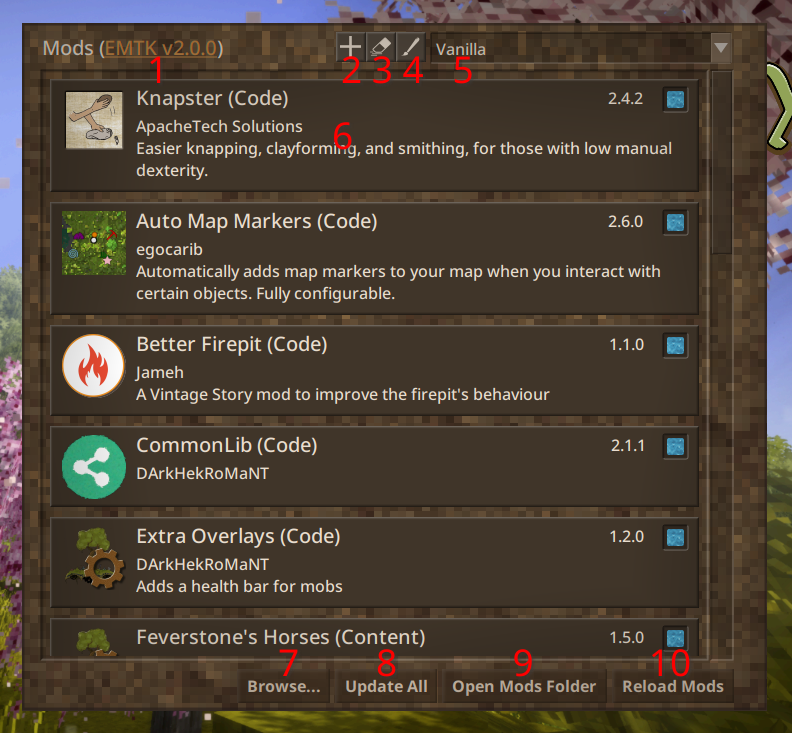
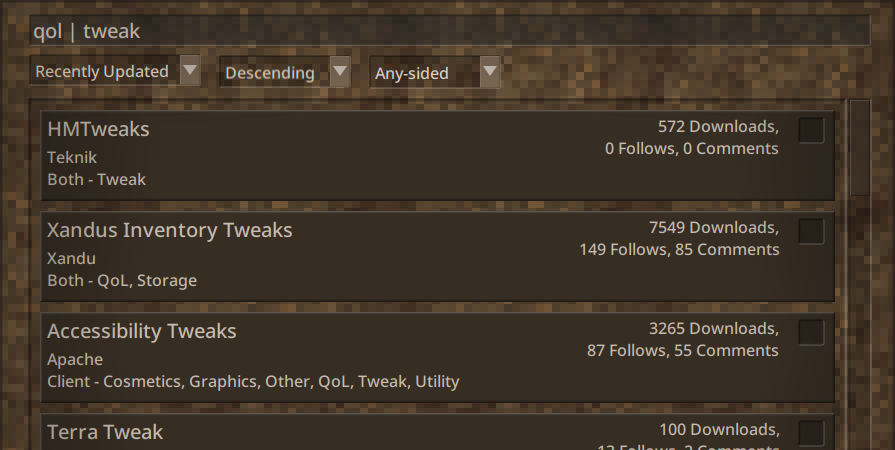
<p><em><span style="color: #e74c3c;"><strong>This is a zip file containing an executable, not a mod you put in the mod folder. Why? Because mods that could modify the title screen were patched out by the devs, so this is the next best thing.</strong></span></em></p> <p><span style="color: #e74c3c;"><strong><em>Both a Windows and Linux version are available. Let me know of any issues on <a href="https://discord.gg/pBFqEcXvW5">Discord</a>.</em></strong></span></p> <h2>Description</h2> <p>Early Mod Toolkit is an executable wrapper that launches Vintage Story with several patches to the mod screen and loader. In specific, it adds the ability to browse mods, swap out various mod profiles (for differing servers), update or downgrade mods, and load mods early (before loading into a world) from within the game itself. It also logs the time it takes to run any C# code in a mod. If you want to help localize the mod, you can do so via an early mod as described below.</p> <p>Got a problem with this wrapper or need to see it updated? Let me know on my <a href="https://discord.gg/pBFqEcXvW5">Discord</a>! Support me on <a href="https://www.patreon.com/mathgeniuszach">Patreon</a> or <a href="https://ko-fi.com/mathgeniuszach">Ko-Fi</a>.</p> <p>I also recommend checking out Laerinok's <a href="https://mods.vintagestory.at/modsupdater">ModsUpdater</a> script if you want just the automatic mod updating functionality without all the extra features, or if you're running a server. EMTK also doesn't play well with Maestro's <a href="https://mods.vintagestory.at/vintagelauncher">Vintage Launcher</a>, while ModsUpdater does a bit better.</p> <p><span style="color: #e74c3c;"><em>NOTE: This is a zip file contaning an executable, not a mod you put in the mod folder. If you installed Vintage Story automatically, you should just be able to run the linux or windows executable</em><em> and it will automatically find the game; if this doesn't work for you or if you installed Vintage Story manually, put the Vintagestory executable and any dlls into the place</em><em> you installed Vintagestory and try running it again.</em></span></p> <h2>Usage</h2> <p><img src="https://mods.vintagestory.at/files/asset/7058/installed.png" alt="Installed Mods page with numbers" width="475" height="440" /></p> <p>In the new mod screen screenshot, here's a list of what each of the numbers mean:</p> <ol> <li>Clicking on this link will open the EMTK page (this page). Occasionally it will say "Update!!!" which means a new update is available.</li> <li>Adds a new empty mod profile.</li> <li>Erases the current mod profile.</li> <li>Renames the current mod profile.</li> <li>Dropdown for swapping existing profiles.</li> <li>Clicking on the left side of the mod will open up a new screen showing the mod's versions and description as found on the ModDB. Clicking on the little toggle cells on the right side disable/enable installed mods.</li> <li>This button opens up the mod browser, for browsing and quickly installing/uninstalling mods with the toggle cells on the right side.</li> <li>This button checks for any updates of the currently installed mods. In the screen that pops up, turn the toggle cells off for any mod you do not want to update.</li> <li>In the base game, opens the mod folder.</li> <li>In the base game, reloads all mods.</li> </ol> <h2>Early Mods</h2> <p>To create mods which load on the title screen, add a new json file to your mod zip called "earlymod.json" (dll-only mods not supported). The presence of this file is enough to get the mod and it's assets to load early (for modding language files and textures on the title screen, for example), but you can specify the field (in the json), "ReloadTitle" (boolean) to change if after enabling/disabling the mod the title screen should be reloaded, and you can also specify the field, "LoadOrder" (double), to change the order the mod and its assets get loaded in (smaller numbers go first).</p> <p>The default json is: <code>{"ReloadTitle": false, "LoadOrder": 0.0}</code></p> <p>EMTK also adds two optional static callbacks called on every ModSystem for code mods:</p> <ul> <li><code>static void EarlyLoad(ModContainer mod, ScreenManager sm)</code><br /> Called when mods are loaded/reloaded and the mod is not disabled, or when the mod is re-enabled.<br /> "mod" is the ModContainer this code was found in.<br /> "sm" is the main ScreenManager object used to swap guis and store a lot of early game methods.</li> <li><code>static void EarlyUnload()</code><br /> Called when mods are reloaded, or if this mod is disabled/removed.<br /> On reload, unloading occurs in the opposite order of loading.</li> </ul> <p>It's not always feasible for every mod to be "Unloaded" or "Reloaded" with certain changes, but it leads to the best user experience when the user can disable/enable any mods ingame with a runtime reload. If this is not possible, indicate it in your mod description, and guard your EarlyLoad() function with a variable so it only runs once.</p>
Ratings & reviews
Sign in to leave a rating or comment.



