About Entities Configuration
From Vintage Story ModDBEasily control the spawnrate of all base game creatures and most creature mods with an in-game UI
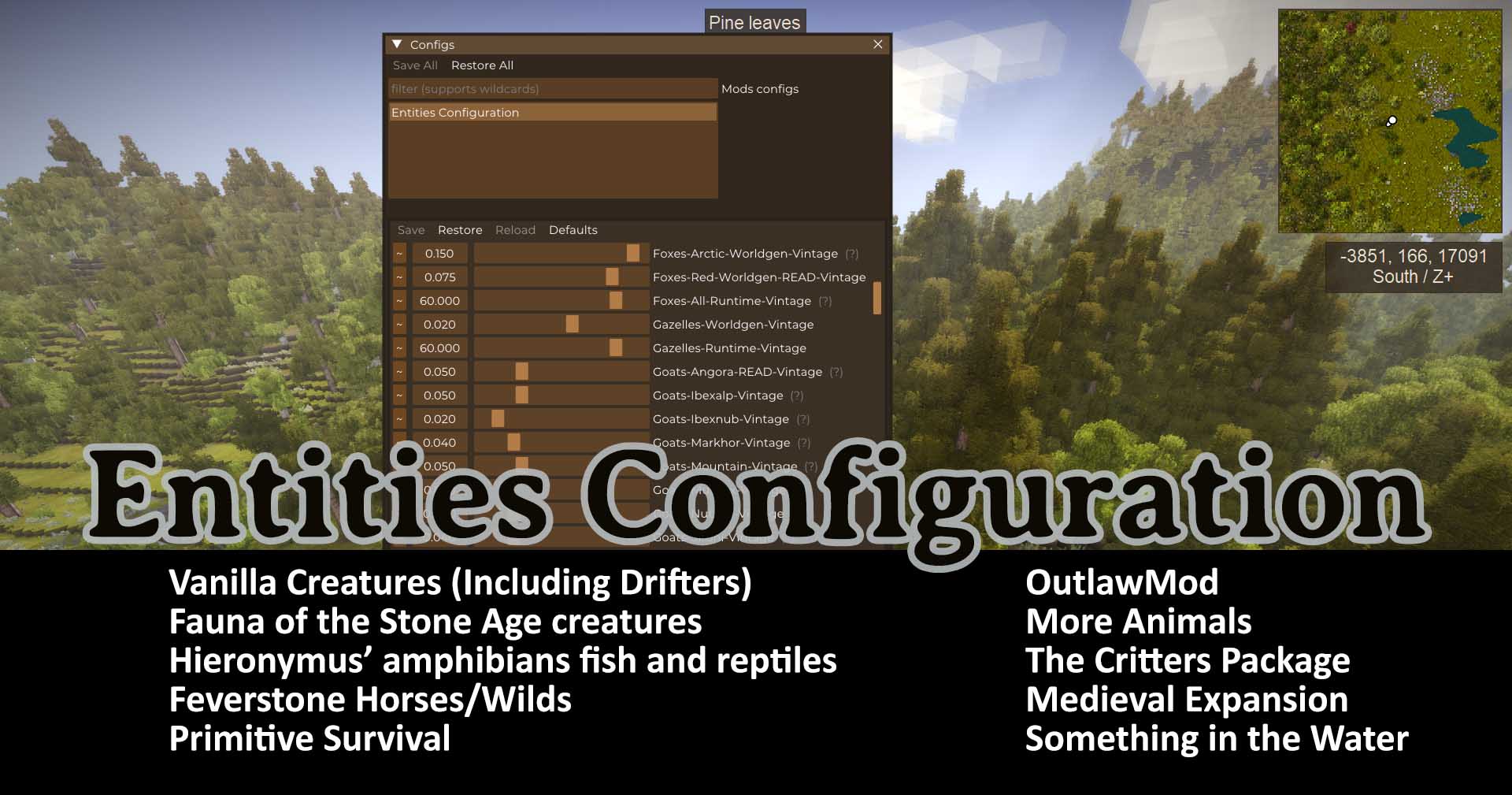
Supported Mods
Fauna of the Stone Age Packs: Caninae, Capreolinae, Casuariidae, Dinorthiformes, Machairodontinae, Manidae, Pantherinae, Rhinocerotidae, Sirenia,
Hieronymus Packs: African Monitor Lizards, Asian Monitor Lizards, Banded Geckos, Bearded Dragons, Giant Gouramis, Knobtailed Geckos, Leopard Geckos, New Zealand Frogs, New World Pond Frogs, New World Giant Tortoises, Old World Pond Frogs, Pacific Newts, Peacock Basses, Rain Frogs, True Sunfishes,
Other Packs Cats, The Critters Package, Feverstone's Horses, Feverstone Wilds, Medieval Expansion, More Animals, OutlawMod, Primitive Survival, Something in the Water, Untamed Wilds: Ursidae,
Description
With this mod you can use an in-game interface to control all creature spawning. This could be used for many things, like disabling drifters or bears, balancing creature spawning with specific mods like Biomes, increasing spawns for specific types of playthroughs and the possibilities go on. This is a companion pack for Entities Interact which gives creatures seek/flee interactions between different modpacks.
Important Notes
- Untamed Wilds: Ursidae: If you use this pack, make sure to disable Vintage bears (I left comments for reminders).
- FotSA Canina: If you use this pack, make sure to disable Vintage wolves and foxes.
- FotSA Capreolinae: If you use this pack, make sure to disable the specific listed Vintage deer and Vintage moose.
- Every entity is configured to default values, even the mods. It is of my opinion that some creatures spawnrates are too high. That is just my opinion, so now you can change it to your liking. Play the way you want!
- Deer, goats, hyenas, raccons and moose will be completely disabled if you turn their worldgen to 0. If you find any others that this happens for, let me know.
- Untamed wilds, FotSA creatures and Hieronymus tortoises have both male and female spawn pools, effectively doubling the spawning.
- Untamed wilds, FotSA creatures and Hieronymus creatures only spawn on runtime.
- Read the comments by each creature. It will save you headaches in the future.
- If you use a lot of creature mods and something is not working as intended, check that it didn't release after this mod. However, I don't see any issues like that since this only changes worldgen and runtime spawnrates.
- FeverstoneHorses, FeverstoneWilds, TheCrittersPackage are supported, but have exhibited some strange behaviors (see issues below).
Settings
The default key to open config settings is P. You can see the screenshot I took of where to find the controls for rebinding if another mod overwrote that keybind.
Worldgen: For most creatures, if you turn this off, they no longer spawn when you are discovering new chunks. However, for some creatures, when you turn worldgen to 0 they no longer spawn even on runtime. So that being said, I put notes by those creatures.
- The numbers for worldgen go from .001 to .2 maximum. This is because if you turn the numbers any higher than .2 you may get some odd creature spawning behavior for certain entities and I haven't figured out the difference. I honestly don't know if there is anything to do about it.
Highlights
From source dataGame versions
Supports 24 Vintage Story versions, the newest being 1.19.8.
Footprint
Rated a light load on a server.
Entities Configuration on Nxeon
From our catalogue- One-click install
- Supported on Nxeon Vintage Story servers. We download it from Vintage Story ModDB, place it, and restart the server.
- Server side
- Required on the server
- Server load
- light
- Smallest plan we suggest
- Vintage Story — 1 GB (1 GB RAM). This follows our own load rating above, not a benchmark.
Run Entities Configuration on a Vintage Story server
Pick a server or deploy a new one above; it is installed in one click.
What kind of mod it is
From the catalogQuality of life & UI
Small conveniences, tweaks and interface improvements players notice straight away.
Runs on your server
From source side supportVintage Story ModDB lists Entities Configuration as required on the server. Check its Vintage Story ModDB page to see whether players need it too.
Compatibility
- Game
- Vintage Story
- Runs on
- Serverrequired on the server
- Game versions
- 1.19.8 and 23 earlier
Verified at the source
- ✓Vintage Story ModDBOfficial listing, checked 2026-09-24Open ↗
- ✓AuthorDnd, as published on Vintage Story ModDB
- ✓LicenseNot published by the sourceFree