About Grindstones
From Vintage Story ModDBAdds the ability to repair your metal tools at the expense of their maximum duarbility.
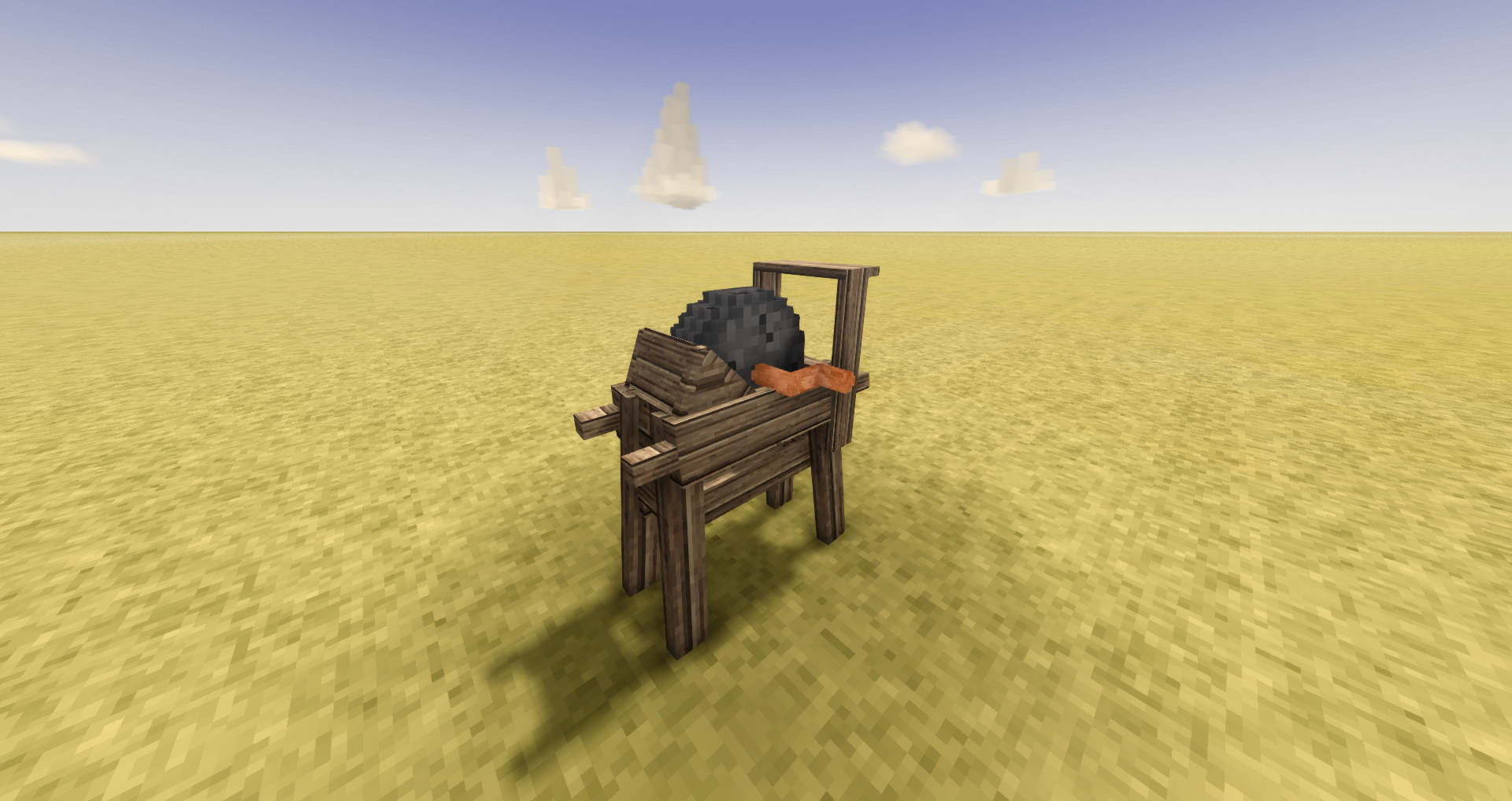
This mod adds a grindstone frame and a grinding wheel for that frame, which when placed inside, allows you to repair your tools. The vanilla grindstone currently (1.22.0) only sharpens the falxes, giving it a damage multiplier, this mod allows you to repair tools and configure what you can and can't repair using this mod's grindstone. At the moment this functionality is mostly for aesthetics; but you can make the wheel with any metal rod and one of the same four types of rock you can make a quern out of and you can make the frame out of any nails and any wooden boards.
Config:
DurabilityPointsRepairedPerPointLost: How many durability points an item gets for every point it loses (depricated with automatic updating support)RatioMaxDurabilityLossToDurabilityGain- The ratio of how many max durability points are lost and how many points durability are repaired every tick
- Supports 0 durability loss
- Only support integers at the moment
- Default: "1:4"
SafeSharpening- If enabled prevents extra durability loss at the tail end of repairing a tool so you always get a repair with the exact ratio you specified
- Defualt: false
Whitelist- Overrides all other settings to allow specified tools to be repaired
- Default: []
Blacklist- Overrides all other settings besides the whitelist to disallow specified tools from being repaired
- Default: []
NotRepairableToolTypes- Black list of tools to not repair
- Default: [ "bow", "sling", "firearm", "crossbow", "shield" ]
AllowedRepairableMaterials- White list of material types that can be repaired
- Default: [ "unspecified", "copper", "tinbronze", "bismuthbronze", "blackbronze", "gold", "silver", "iron", "meteoriciron", "steel", "ornategold", "ornatesilver" ]
/gconfig ratioget- Prints the current ratio setting
set <ratio>- Set the ratio to <ratio>
- must be in <integer>:<integer> format
toDefault- Resets the value to its default
/gconfig safetyget- Prints the current safe sharpening setting
set <state>- Set the safe sharpening sate to <state>
- Must me 1/0, True/False, or enable
toDefault- Resets the safe sharpening to its default value
/gconfig whitelistget- Prints the current tool whitelist
add [tool]- Adds [tool] to the whitelist
- You can either type in a specific tool code or hold the tool you want to whitelist
remove [tool]- Removes [tool] from the whitelist
- You can either type in a specific tool code or hold the tool you want to whitelist
toDefault- Resets the whitelist to default/clears the whitelist
/gconfig blacklistget- Prints the current tool blacklist
add [tool]- Adds [tool] to the blacklist
- You can either type in a specific tool code or hold the tool you want to blacklist
remove [tool]- Removes [tool] from the blacklist
- You can either type in a specific tool code or hold the tool you want to blacklist
toDefault- Resets the blacklist to default/clears the blacklist
/gconfig disallowedToolget- Prints the too types that are currently disallowed from repair
add [toolType]- Adds [tooltype] to the tool type blacklist
- You can either type in a specific tool type or hold the tool of the type you want to add to the tool type blacklist
- Must be in the tools enum in vintage story
remove [toolType]- Removes [tooltype] from the tool type blacklist
- You can either type in a specific tool type or hold the tool of the type you want to remove from the tool type blacklist
- Must be in the tools enum in vintage story
toDefault- Resets the tool type blacklist back to its default value
/gconfig allowedMaterialget- Prints the materials that are currently allowed to be repaired
add [material]- Adds [material] to the material whitelist
- You can either type in a specific material or hold the tool of the material you want to add to the material whitelist
remove [material]- Removes [material] from the material whitelist
- You can either type in a specific material or hold the tool of the material you want to remove from the material whitelist
toDefault- Resets the material whitelist back to its default value
Commands are also aliased to /gsettings
Compatability:
Highlights
From source dataGame versions
Supports 23 Vintage Story versions, the newest being 1.21.6.
Footprint
Rated a light load on a server.
Grindstones on Nxeon
From our catalogue- One-click install
- Supported on Nxeon Vintage Story servers. We download it from Vintage Story ModDB, place it, and restart the server.
- Server side
- Required on the server
- Server load
- light
- Smallest plan we suggest
- Vintage Story — 1 GB (1 GB RAM). This follows our own load rating above, not a benchmark.
Run Grindstones on a Vintage Story server
Pick a server or deploy a new one above; it is installed in one click.
What kind of mod it is
From the catalogQuality of life & UI
Small conveniences, tweaks and interface improvements players notice straight away.
Runs on your server
From source side supportVintage Story ModDB lists Grindstones as required on the server. Check its Vintage Story ModDB page to see whether players need it too.
Compatibility
- Game
- Vintage Story
- Runs on
- Serverrequired on the server
- Game versions
- 1.21.6 and 22 earlier
Verified at the source
- ✓Vintage Story ModDBOfficial listing, checked 2026-09-24Open ↗
- ✓AuthorAartHauk, as published on Vintage Story ModDB
- ✓LicenseNot published by the sourceFree