







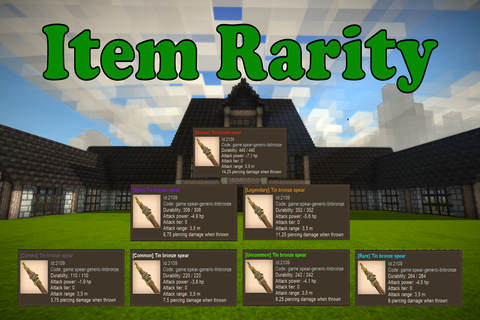
About Item Rarity
From Vintage Story ModDBThis mod introduces a rarity mechanic to items.
Item Rarity Mod
Add excitement and variety to your Vintage Story experience with the Item Rarity Mod! This mod introduces a rarity system** for tools, affecting their stats and adding special effects. Every time you craft or find a tool, it has a chance to receive a rarity making each item feel unique and powerful!
Features
Stat Modifiers
Each rarity level modifies core tool stats, making tools stronger or more efficient based on their rarity.
Affected stats:
- Durability - Increase or decrease items durability.
- Mining Speed - Increase or decrease mining speed.
- Attack Power - Increase or decrease damage dealt.
- Attack Range - Increase or decrease the reach of melee weapons.
- Piercing Power - Increase or decrease damage dealt by piercing attacks (thrown spears, arrows, etc.).
- Armor Flat Damage Reduction - Increase or decrease flat damage reduction on armor.
- Shield Protection - Increase or decrease the effectiveness of shields.
Magical Effects
Rarities can also grant magical effects. These effects can add dramatic new abilities to your tools.
Available effects:
- Thor – When hitting a target with a piercing weapon, strikes lightning and sets the target on fire.
Commands
<table> <thead> <tr> <th>Command</th> <th>Description</th> </tr> </thead> <tbody> <tr> <td>⚠️ All commands require operator (admin) permissions.
/rarity set <rarity></td> <td>Assigns the specified rarity to the item currently held.</td> </tr> <tr class="intellij-row-even"> <td>/rarity reload</td> <td>Reloads the configuration without restarting the game/server.</td> </tr> <tr> <td>/rarity roll <times></td> <td>Simulates multiple rarity rolls and displays results with probabilities.</td> </tr> </tbody> </table> Configuration
Customize rarities to match your server's balance or your personal gameplay style. Each rarity level supports detailed customization. You can create as many rarities as you want and adjust their stats to balance gameplay your way.
Multipliers supports fixed number e.g
1.5 or range e.g [0.2, 0.9]. When using a range, the multiplier is chosen randomly within the range.
Example Configuration
"my-super-rarity": { "Key": "my-super-rarity", "Name": "Super Rarity", "Level": 4, "Color": "#606060", "Weight": 8.0, "DurabilityMultiplier": [0.2, 0.9], "MiningSpeedMultiplier": 1.5, "AttackPowerMultiplier": 1.5, "AttackRangeMultiplier": 1.5, "PiercingPowerMultiplier": 1.5, "ArmorFlatDamageReductionMultiplier": 1.5, "ArmorPerTierFlatDamageProtectionLossMultiplier": 1.5, "ShieldProtectionMultiplier": 2, "CustomAttributes": {}, "Effects": ["Thor"], "IgnoreTranslation": false }</pre> <table> <thead> <tr> <th>Field</th> <th>Description</th> </tr> </thead> <tbody> <tr> <td>
Key</td> <td>Key used by the mod to identify rarities. BE CAREFUL CHANGING THIS CAN CAUSE PROBLEMS</td> </tr> <tr class="intellij-row-even"> <td>Name</td> <td>Display name of the rarity (can be localized).</td> </tr> <tr> <td>Level</td> <td>Numerical rarity level (It is a numerical representation of the rarity).</td> </tr> <tr class="intellij-row-even"> <td>Color</td> <td>Hex color code shown in item display.</td> </tr> <tr> <td>Weight</td> <td>Used for selection. Higher = more common. (See "How Rarity Works" below)</td> </tr> <tr class="intellij-row-even"> <td>DurabilityMultiplier</td> <td>Affects durability.</td> </tr> <tr> <td>MiningSpeedMultiplier</td> <td>Affects mining speed.</td> </tr> <tr class="intellij-row-even"> <td>AttackPowerMultiplier</td> <td>Affects melee damage.</td> </tr> <tr> <td>AttackRangeMultiplier</td> <td>Affects weapon reach.</td> </tr> <tr class="intellij-row-even"> <td>PiercingPowerMultiplier</td> <td>Affects piercing damage.</td> </tr> <tr> <td>ArmorFlatDamageReductionMultiplier</td> <td>Affects armor flat damage reduction.</td> </tr> <tr class="intellij-row-even">Highlights
From source dataGame versions
Built for Vintage Story 1.20.0-rc.5.
Footprint
Rated a light load on a server.
Item Rarity on Nxeon
From our catalogue- One-click install
- Supported on Nxeon Vintage Story servers. We download it from Vintage Story ModDB, place it, and restart the server.
- Server side
- Required on the server
- Server load
- light
- Smallest plan we suggest
- Vintage Story — 1 GB (1 GB RAM). This follows our own load rating above, not a benchmark.
Run Item Rarity on a Vintage Story server
Pick a server or deploy a new one above; it is installed in one click.
What kind of mod it is
From the catalogQuality of life & UI
Small conveniences, tweaks and interface improvements players notice straight away.
Runs on your server
From source side supportVintage Story ModDB lists Item Rarity as required on the server. Check its Vintage Story ModDB page to see whether players need it too.
Compatibility
- Game
- Vintage Story
- Runs on
- Serverrequired on the server
- Game versions
- 1.20.0-rc.5
Verified at the source
- ✓Vintage Story ModDBOfficial listing, checked 2026-09-24Open ↗
- ✓AuthorUnreal, as published on Vintage Story ModDB
- ✓LicenseNot published by the sourceFree
More like Item Rarity
Other Vintage Story mods, same category first, ranked by real downloads.


QP's Chisel Tools
Quality of life & UI · Vintage Story ModDB
Unleash your creativity while chiseling! Invaluable, survival friendly tool set for chiselers!


Expanded Foods: Core 2.0.0-dev.14
Quality of life & UI · Vintage Story ModDB
Adds a variety of new uses for existing foods.
Player Corpse
Quality of life & UI · Vintage Story ModDB
Creates a corpse with the player's inventory after death


Animal cages
Quality of life & UI · Vintage Story ModDB
Adds cages to the game for capturing animals.


Stone Quarry
Quality of life & UI · Vintage Story ModDB
Allows you to dig a lot of stone and process into rock, bricks, polished rock, sand, gravel, etc


BetterRuins
World generation · Vintage Story ModDB
Adds many new ruins over and underground to your survival game world.


Carry On
Building & decoration · Vintage Story ModDB
Adds the capability to carry various things. Replaces CarryCapacity.


Primitive Survival
Cosmetics, visuals & audio · Vintage Story ModDB
Fishing, trapping, irrigation, smoker, nightcrawlers, snakes, and much more!
Item Rarity, answered
Generated from the mod’s own source data.
Do my players need to install Item Rarity?
Vintage Story ModDB lists Item Rarity as required on the server. Check its Vintage Story ModDB page to see whether players need it too.
Is it free?
Yes. Item Rarity is free to download from Vintage Story ModDB.
How do I add it to my Nxeon server?
Use “Add to a server” on this page, or open NxLabs from your dashboard. We install it, restart your server and switch it on.

Run Item Rarity on a Vintage Story server.
Deploy in about a minute from $4.00 a month, then add Item Rarity in one click.