
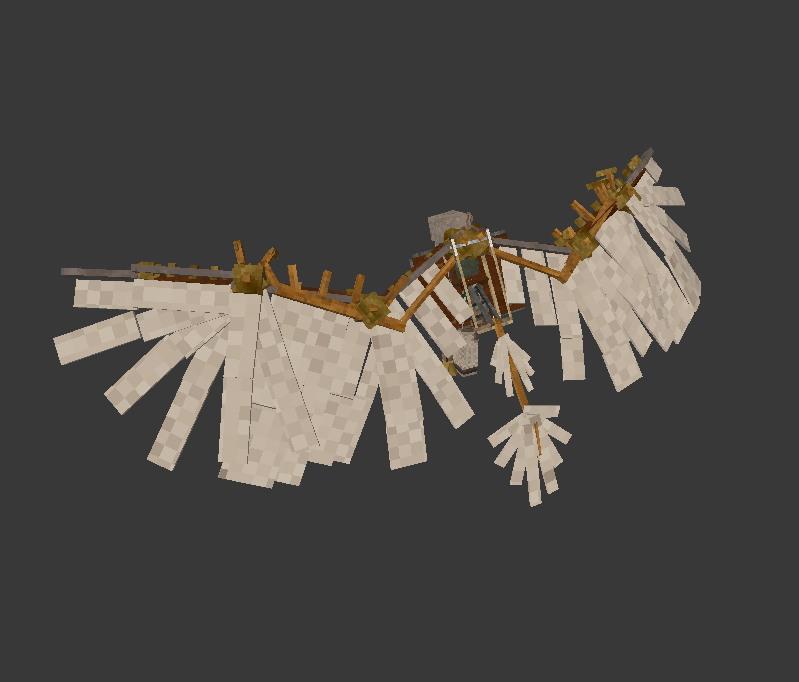
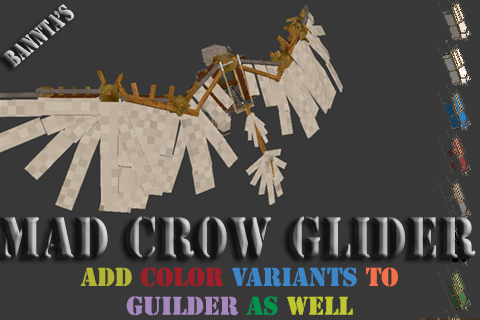
Mad Crow Glider
A Gliders made to have the appearence of a Tobias's Mad Crow wings and Color Variants for Gliders
Description
<div>Found on the back side of the <em>Customized translocator schematic</em> is a rough pencil sketch of a glider that appears to be the first progress of the Mad Crow; Label <strong>Phase one, Will it Fly?</strong></div> <div> </div> <div>A primitive frame of aged wood and cured leather, lacking the Temporal Gears or metallic reinforcements seen in later iterations. It is a pure aerodynamic study of what would become the Mad Crow, the mechanical guardian of the Devastation Tower</div> <div> </div> <div>Thoughts...Structural Paradox: By sketching a glider on the back of a Translocator schematic, the author implies that if one cannot move through space instantly, they must at least move through the air gracefully. It suggests a desperate period of invention where paper was scarce, and ideas were plentiful. The question "Will it Fly?" is a nod to the "rickety" nature of early temporal tech. Much like the Rickety Translocator itself, which Tobias provides only after you retrieve the lens from the Crow. This glider represents the era of Jonas's early experiments before the "awakening" of the mechanicals.</div> <div> </div> <div><strong>FEATURES</strong></div> <ul> <li>The Mod adds the ability to have colored Gliders</li> <li>End Game Glider after collecting a <em><strong>customized translocator schematic.</strong></em></li> <li>Updated configuration-enabled <em>(default is disabled) <strong>Glider Glider(Note: </strong>For some reason I refer to it as Glider Reforge)<strong>, </strong></em>which is fully configurable(I tweaked the setting that provided the best feel for gliding base of old post on the Glider Reforge Page, along with some tweaking). <ul> <li>If Glider Reforge (<strong>It's Glider Glider</strong>) is enabled, then the Glider will inherit the new settings.</li> </ul> </li> <li>End Game Glider: The Mad Crow Glider NOW FLAPS, and if fully enabled, provides slight vertical lift and a forward speed bump</li> <li>Vanilla visual issue where, when another player views a glider in flight, it appears standing up in a walk pose. This will be fixed using this mod.</li> </ul> <div> </div> <div> </div> <div> <div class="spoiler"> <div class="spoiler-toggle">Construction:</div> <div class="spoiler-text"> <p>STS</p> <p>CPC</p> <p>GLG</p> <p>(S)6 tinbronze rods, (T)Customized translocator schematic, (L)Glider schematic, (C)2 Pieces of the same cloth color, (G)6 rusty gears and (P)Normal plain Leather piece.</p> </div> </div> <p> </p> <p>Configuration settings.</p> <div class="spoiler"> <div class="spoiler-toggle">madcrowgliderconfig.json default setting (note you nust enable to use new features)</div> <div class="spoiler-text"> <p>{<br> "MadcrowgliderSpeedMax": 1.5,<br> "MadcrowgliderSpeedFactor": 0.7,<br> "MadcrowgliderFallSpeed": 0.9,<br> "MadcrowgliderQuantitySlots": 16,<br> "GliderQuantitySlots": 4,<br> "MadcrowgliderVerticalLerpFactor": 25.0,<br> "MadcrowgliderHorizontalLerpFactor": 40.0,<br> "MadcrowgliderSetGliderReforge": false,<br> "MadcrowgliderSetMadcrowgliderFlap": false,<br> "MadcrowgliderShowSpeed": false, <br> "MadcrowgliderFlapCooldown": 4.0,<br> "MadcrowgliderFlapLiftVelocity": 4.0,<br> "MadcrowgliderMaxStamina": 100.0,<br> "MadcrowgliderFlapStaminaCost": 34.0,<br> "MadcrowgliderStaminaRegenPerSecond": 12.0,<br> "MadcrowgliderStaminaRegenDelay": 1.2<br>}</p> <p> </p> <div>//-- Configuration helpers --//</div> <div> </div> <div>"madcrowglider:MadCrowQuantitySlots": "Set the MadCrow Glider QuantitySlots(backpack slots default 2)",</div> <div>"madcrowglider:VanillaQuantitySlots": "Set the Vanilla Glider QuantitySlots(backpack slots default 1)",</div> <div>"madcrowglider:speedMax": "Set the GliderReforge speedMax(default 1.5)",</div> <div>"madcrowglider:speedFactor": "Set the GliderReforge speedFactor(default 0.25)",</div> <div>"madcrowglider:fallSpeed": "Set the GliderReforge fallSpeed(default 0.5)",</div> <div>"madcrowglider:verticalLerpFactor": "Set GliderReforge verticalLerpFactor(default 25)",</div> <div>"madcrowglider:horizontalLerpFactor": "Set the GliderReforge horizontalLerpFactor(default 40)",</div> <div>"madcrowglider:setGliderReforge": "Enables GliderReforge Mofications (default false)",</div> <div>"madcrowglider:setMadcrowgliderFlap": "Enables the Madcrowglider Flap for vertical lift(default false,if true requires GliderReforge to be true)",</div> <div>"madcrowglider:ShowSpeed": "Enables the HuD system(default false)",</div> <div>"madcrowglider:flapCooldown": "Set countdown to send another flap(default 4 seconds)",</div> <div>"madcrowglider:flapLiftVelocity": "Vertical Lift, How Far you flap up(default 1.2 about 10meters up)",</div> <div>"madcrowglider:maxStamina": "Madcrowglider Max Stamina(default 100)",</div> <div>"madcrowglider:flapStaminaCost": "flap Stamina Cost(default 34, = 3 flaps)",</div> <div>"madcrowglider:staminaRegenPerSecond": "stamina Regen Per Second(default 1.5)",</div> <div>"madcrowglider:staminaRegenDelay": "stamina Regen Delay(default 1.2 about 10meters up)"</div> </div> </div> <p> </p> <p><strong>NEW FEATURES</strong></p> <p>To fully use the new features, they must be enabled in the configuration file. If not, you should be able to see the flap animation(To Flap, one press every 4 seconds)., it will run like the vanilla system.</p> <p> "MadcrowgliderSetGliderReforge": true, // if set to true - This enables the Glider Reforge Settings and facilitates Vertical Lift when MadCrow Glider Flaps<br> "MadcrowgliderSetMadcrowgliderFlap": true, // if set to true - This enables the Vertical Lift when MadCrow Glider Flaps<br> "MadcrowgliderShowSpeed": true, // if set to true - This enables the in-flight HUD</p> <p> </p> <p><strong>NOTE: To Flap, press the space bar only once(there is a cooldown of 4 seconds before another flap can happen); <em>double
Ratings & reviews
Sign in to leave a rating or comment.



