

ModsUpdater For Linux
Your go-to buddy for always-up-to-date Vintage Story mods - Not a mod, but a program -
Description
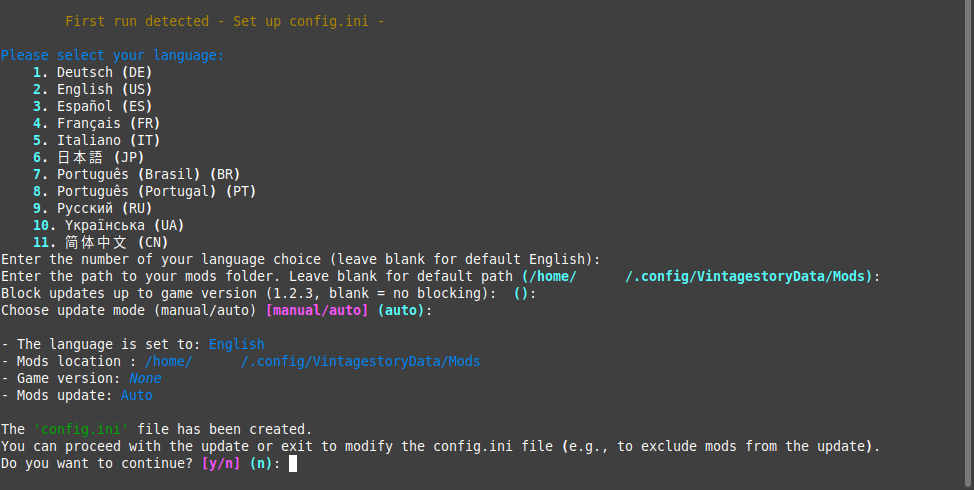
<h1 style="text-align: center;">Vintage Story ModsUpdater for Linux (Appimage)</h1> <h2 style="text-align: center;">Keep your mods in sync, effortlessly.</h2> <p> </p> <p style="text-align: left;">Tired of manually checking for mod updates? ModsUpdater is a standalone tool that automates the entire process. It checks, downloads, and backs up your mods, so you can spend less time managing and more time playing.</p> <p> </p> <p style="text-align: left;"><strong><a href="https://mods.vintagestory.at/modsupdater" target="_blank" rel="noopener">Windows Version</a> | <a href="https://mods.vintagestory.at/modsupdaterformacos" target="_blank" rel="noopener">macOS Version</a> | <a href="https://github.com/Laerinok/VS_ModsUpdater_v2/wiki" target="_blank" rel="noopener">Project Wiki</a> | <a href="https://github.com/Laerinok/VS_ModsUpdater_v2/blob/main/DOCUMENTATION.md" target="_blank" rel="noopener">Documentation</a> | <a href="https://discord.com/channels/302152934249070593/1450769339383939268" target="_blank" rel="noopener">Discord</a></strong></p> <p> </p> <p><strong>For those who want it, the <em><a href="https://github.com/Laerinok/VS_ModsUpdater_v2/releases/download/v2.6.0/VS_ModsUpdater.v2.6.0_Linux_ARM64.AppImage">Linux_ARM64_AppImage</a></em> version is available on <a href="https://github.com/Laerinok/VS_ModsUpdater_v2/releases" target="_blank" rel="noopener">GitHub</a>.</strong></p> <p> </p> <p><span style="color: #e74c3c; font-size: 18pt;"><strong>Important - Please Read Before Use</strong></span></p> <ul> <li><span style="color: #e74c3c;">This is a <strong>standalone program</strong>, not a mod. Do <strong>not</strong> put it in your mods folder. Unzip it anywhere and run the executable in the <strong>terminal</strong> or use a <a href="#desktop_file">.desktop file</a>.</span></li> <li><span style="color: #e74c3c;">Always <strong>back up your save game</strong> before updating mods. A new mod version can sometimes cause issues with an existing world.</span></li> <li><span style="color: #e74c3c;">Use the <strong>Mod Exclusion</strong> feature for terrain generation mods. Once a world is created, these mods should generally not be updated.</span></li> <li><span style="color: #e74c3c;">For those cautious about executables, a VirusTotal analysis link is included in the changelog for each new release.</span></li> </ul> <p> </p> <h2>Key Features</h2> <ul> <li><strong>Automatic Update Check</strong>: Scans your mods and compares them to the latest versions on the ModDB.</li> <li><strong>Smart Downloading</strong>: Downloads new versions automatically or lets you choose manually after reviewing changelogs.</li> <li><strong>Automatic Mod Downgrade</strong>: If a mod is too new for your game version, the updater finds and installs the latest compatible version.</li> <li><strong>Incompatibility Warnings</strong>: Alerts you if a mod is incompatible with your game version.</li> <li><strong>Safe Backups</strong>: Automatically backs up mods before updating, with a configurable limit.</li> <li><strong>Modlist Generation</strong>: Generates a shareable list of your installed mods in PDF, JSON, and HTML formats.</li> <li><strong>Detailed Logging</strong>: Creates comprehensive log files for easy troubleshooting.</li> <li><strong>Exclusion List</strong>: Easily prevent specific mods from being updated via the config file.</li> <li><strong>Multi-Language & Self-Updating</strong>: The tool is available in 13 languages and checks for its own updates at launch.</li> </ul> <p> </p> <h2>How To Use</h2> <p class="first-token"><span class="">I'll include a </span><strong class=""><a id="desktop_file"></a>.desktop</strong><span class=""> file in the next versions,</span><span class=""> but in the meantime,</span><span class=""> here is an example of working content.</span><span class=""> (You just need to remember to modify the </span><strong class="">AppImage</strong><span class=""> file name for new versions,</span><span class=""> or if you rename it.</span><span class="">)</span></p> <ul> <li> <p>Create a <strong>.desktop</strong> file next to <strong>VS_ModsUpdater-X.Y.Z-x86_64.AppImage</strong> (for example: <strong>VS_ModsUpdater.desktop</strong>)</p> </li> <li> <p>Edit it and paste this code:</p> </li> </ul> <div class="code-block ng-tns-c586150460-20 ng-animate-disabled ng-trigger ng-trigger-codeBlockRevealAnimation" data-hveid="0" data-ved="0CAAQhtANahcKEwjQt5vMs8GQAxUAAAAAHQAAAAAQPg"> <div class="formatted-code-block-internal-container ng-tns-c586150460-20"> <div class="animated-opacity ng-tns-c586150460-20"> <pre class="ng-tns-c586150460-20" style="padding-left: 40px;"><code class="code-container formatted ng-tns-c586150460-20 no-decoration-radius" role="text" data-test-id="code-content">[Desktop Entry] Version=1.1 Name=VS_ModsUpdater Comment=Keep your mods in sync, effortlessly. Exec=sh -c 'cd "$(dirname %k)" && ./VS_ModsUpdater-2.4.0-x86_64.AppImage' Terminal=true Type=Application Categories=Game;Utility;Application; </code></pre> </div> </div> </div> <ul> <li> <p>Modify the <strong>AppImage</strong> name if necessary.</p> </li> <li> <p>Save</p> </li> <li> <p>Make it executable</p> </li> </ul> <p>You can now use the .desktop file to launche the Appimage.</p> <p> </p> <p>On the first run, the application will guide you through a quick setup by asking for your mods folder path and other basic preferences. This creates the <code>config.ini</code> file for you.</p> <p>After that, simply run the program to check for updates. For advanced changes, like adding mod exclusions, you can edit the <code>config.ini</code> file directly at any time.</p> <p class="ng-star-inserted"> </p> <p class="ng-star-inserted"><strong class="ng-star-inserted"><span class="ng-star-inserted">Remote Server Automation (FTP/SFTP Sync)</span></strong><br class="ng-star-inserted"><span class="ng-star-inserted">If you are hosting your server on a remote provider without termi
Ratings & reviews
Sign in to leave a rating or comment.



