
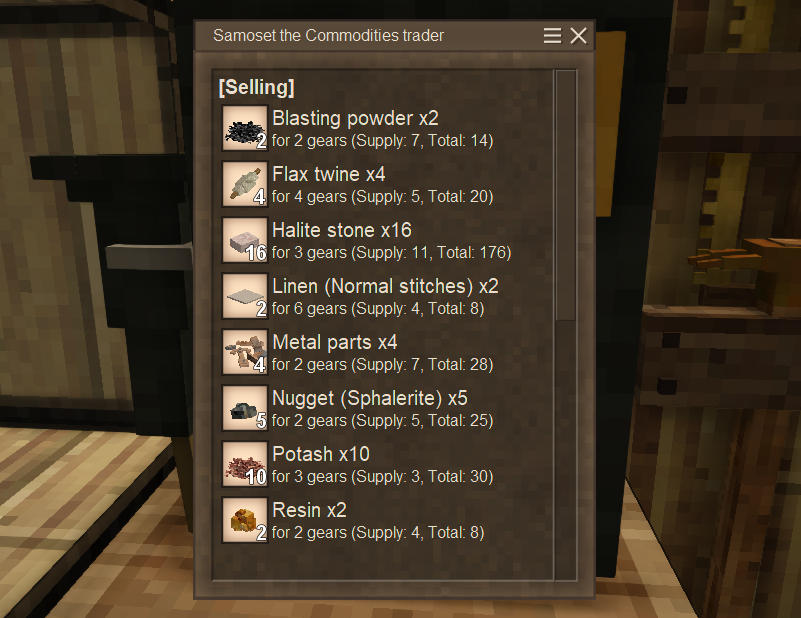
Description
<h2>Overview</h2> <p>This mod adds a Trader Phone, which allows you to remotely check trader's stock.<br>It displays the assigned trader's supply/demand list, gears, and the number of days until the next refresh in the GUI.</p> <p>This mod is marked as beta because some implementation tasks remain, especially for optimization, and its stability needs to be tested.<br>Currently, the Trader Phone allows players to spam chunk loading, so it might not be ideal for a multiplayer server with a large, unspecified number of players.<br>That said, this mod already has all its core functions implemented and should work fine in single player or on a server with only known friends.</p> <p> </p> <div class="spoiler"> <div class="spoiler-toggle">1.22 info</div> <div class="spoiler-text"> <p>There seems to be some vanilla bugs related to trader in 1.22 at this point (rc7)<br><a href="https://github.com/anegostudios/VintageStory-Issues/issues?q=is%3Aissue%20trader">https://github.com/anegostudios/VintageStory-Issues/issues?q=is%3Aissue%20trader</a><br>Please ensure it's not a vanilla bug when you report me an issue.<br>I can't fix it.<br><br>That said, since 1.22 changed trader entity codes, some display issues may occur on this mod.<br>I've addressed it and tested it thoroughly (including saves from 1.21), but if you find remaining issues, feel free to report it.<br>See Help/Contact section to see how to report.</p> <p>As a known tiny issue, memos from 1.21 lack the climate suffix (like "(cold)") in the trader type, unlike those created in 1.22.<br>(Only a display issue, not functionally affects)</p> <h2><img src="https://i.imgur.com/ZPrt07s.png" alt="image"></h2> <p><br>I may add an auto-update feature for memos in the future, but since this currently has almost no impact, it's a low priority.<br>(There's no stock difference between trader climate types)</p> </div> </div> <h2>Crafting</h2> <p>There are multiple Trader Phones with different appearances.<br>Except for small differences such as the selection box, they are functionally identical.</p> <p><img src="https://i.imgur.com/N0n4rZU.png" alt="image" width="726" height="491"></p> <h3>Box style</h3> <p>Box (a.k.a "the original") style can be crafted from:</p> <ul> <li>Bronze or higher lamellae x4<br> <ul> <li>Or bronze or higher plate x2</li> </ul> </li> <li>Temporal gear x2</li> <li>Lead plate x2</li> <li>Any solder bar x1</li> <li>Soldering iron (used as a tool)</li> </ul> <p> </p> <p><img src="https://i.imgur.com/sBhn4Cw.png" alt="image"><img src="https://i.imgur.com/rmHWZJh.png" alt="image"></p> <h3>Wall Box style</h3> <p>The Box style can be converted to/from its wall-mounted version.</p> <p><img src="https://i.imgur.com/fhiTCZ4.png" alt="image"></p> <h3>Antique style</h3> <p>Antique style can be crafted from:</p> <ul> <li>Brass plate x2</li> <li>Temporal gear x2</li> <li>Any board x4</li> <li>Lead plate x1</li> <li>Copper nails and strips x2</li> <li>Parchment x1</li> </ul> <p> </p> <p><img src="https://i.imgur.com/6MfP3zI.png" alt="image"></p> <p>The model was <a href="https://discord.com/channels/302152934249070593/1337504627402342423/1482420575388565696" target="_blank" rel="noopener">provided by Corvus.</a><br>Big thanks!!</p> <h2>Usage</h2> <p>To check a trader's stock, you need to get a phone number memo for that trader and register it to a Trader Phone.<br>First, place a Trader Phone and right-click it with a parchment to create a phone number memo (Blank).<br>Then, obtain a written memo either by using the blank memo on the trader or by searching for their location in the Trader Phone (you can right-click it with a blank memo to open the GUI).<br>Use the written memo on the Trader Phone to register, and after that, you can check the trader’s stock anytime by right-clicking the Trader Phone.</p> <div class="spoiler"> <div class="spoiler-toggle"><span style="font-size: 14pt;"><strong>Step-by-step Guide</strong></span></div> <div class="spoiler-text"> <p><span style="font-size: 14pt;"><strong>1. Create a blank memo</strong></span></p> <p>First, place a Trader Phone and right-click it with a parchment to obtain a phone number memo (Blank).</p> <p><img src="https://i.imgur.com/JM9xIPi.png" alt="" width="732" height="441"></p> <p><img src="https://i.imgur.com/VLHUdtb.png" alt="image"></p> <p>You have two ways to get a trader's phone number memo.</p> <p><span style="font-size: 14pt;"><strong>2-A. Directly use a blank memo on a trader</strong></span></p> <p>Go to the trader and right-click them with a blank memo.</p> <p><img src="https://i.imgur.com/WNYbdfm.png" alt="" width="732" height="441"></p> <p>You will obtain a written phone number memo immediately.</p> <p> </p> <p><img src="https://i.imgur.com/K5TnXy4.png" alt="image"></p> <p> </p> <p><strong><span style="font-size: 14pt;">2-B. Phone number search</span></strong></p> <p>If you already know where the trader is, you can use the phone number search function in the Trader Phone.</p> <ol> <li>Right-click any Trader Phone with a blank memo to open the phone number search GUI</li> <li>Follow the instructions on the GUI; enter the trader's coordinates and click the 'Search' button</li> <li>If the phone successfully finds the trader, their details will be shown on the GUI</li> <li>Click the 'Write Down' button to obtain a written phone number memo</li> </ol> <p><img src="https://i.imgur.com/bc9CW6q.png" alt="image"></p> <p><img src="https://i.imgur.com/NcK1KsN.png" alt="image"></p> <p><img src="https://i.imgur.com/ORXaEfH.png" alt="image"></p> <p><img src="https://i.imgur.com/7gzGe9q.png" alt="image"></p> <p><img src="https://i.imgur.com/Zl2jAoc.png" alt="image"></p> <p>If 'Trader not found' was displayed in step 3, check the following and try again:</p> <ul> <li>Auto-detecting Y may fail, so you might need to enter it manually.</li> <li>If you took the coordinates from the map, zoom in and record them as accurately as possible.</li> </ul> <p><span style="font-size: 14
Ratings & reviews
Sign in to leave a rating or comment.



