
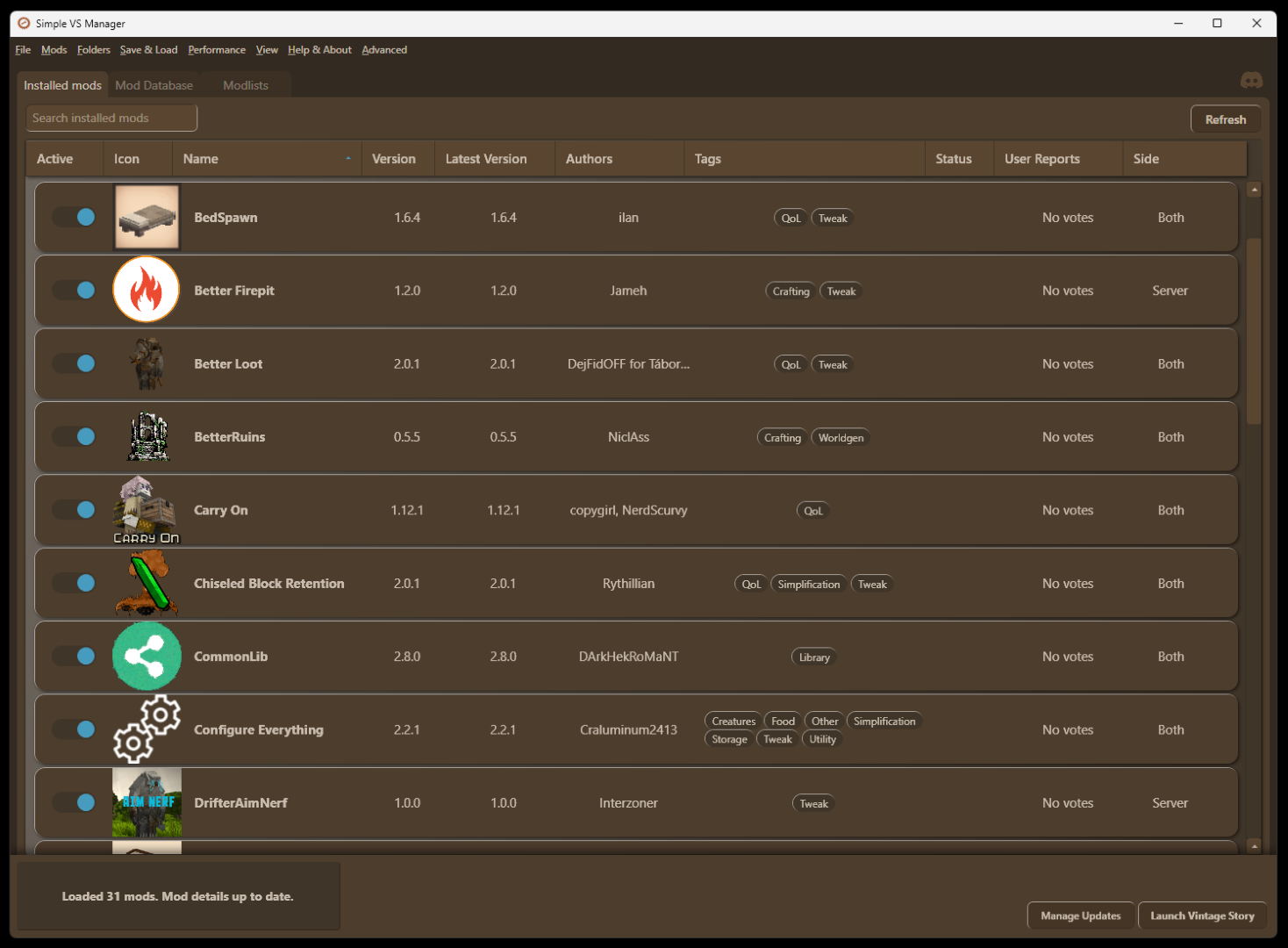
Simple VS Manager
A simple mod manager/launcher with Mod DB Search, Update Manager and shared Modlists
Description
A simple mod manager and launcher for everyday use! I know, I know, another mod manager...
I made it mostly for me (at least in the beginning!), I think it's pretty nice as an alternative to the mod menu ingame - just a bit easier to get an overview and see whats been updated, then launch the game from it.
Download from Github or directly from this page
If you get virus/security warnings sometimes downloading from a source such as Github helps.
Visit the Discord server to add suggestions, report issues or ask questions
Any suggestions are welcome - random ideas, code improvements, performance issues etc.
<span style="font-size: 14pt;">Why it might be useful</span>
- <span style="font-size: 14pt;">No installer; simply extract the zip and open the .exe!</span>
- <span style="font-size: 14pt;">No login, no install, no separate VS installs or importing mod folders</span>
- <span style="font-size: 14pt;">Update mods, all at once or selected, solve mod dependencies, skip versions, and see every new changelog when updating</span>
- <span style="font-size: 14pt;">Modlists - share your Modlists online in a dedicated tab and install other peoples Modlists. You can also save your list as an importable PDF that actually looks OK.</span>
- <span style="font-size: 14pt;">QoL - select and delete mods easily, launch game button, update notifications, tag sorting, presets for enabled/disabled mods, menu for opening those damn folders you always have to navigate to...</span>
- <span style="font-size: 14pt;">Mod DB Search/Browse - fast integrated mod browser, also with the option to use relevant search to actually prioritize what you write instead of sorting after downloads etc.</span>
- <span style="font-size: 14pt;">User Reports System</span> -<span style="font-size: 14pt;"> a fast way to judge if a mod is compatible or not with your game version, see what other users have reported and share your own result to help the community!</span>
- <span style="font-size: 14pt;">Game Profiles (Multiple VS versions)</span> -<span style="font-size: 14pt;"> set a separate Game and Data folder for each profile and switch easily between multiple VS installations.</span>
- <span style="font-size: 14pt;">Customizable</span> -<span style="font-size: 14pt;"> hide/show and move columns, custom color theme, compact view</span>
Other things it does
- If enabled, backup Data folder every time the game is launched through the manager, with ability to rollback.
- Set your existing Vintage Story shortcut as a Launch Game option in case you're using command line arguments
- Switch between any version of a mod using a dropdown list
- You can toggle Disable Internet Access to opt out of all that nice stuff above
- Change to another VintagestoryData folder location
- Color themes, as well as custom colors
- Creates backup modlists for every big action, allowing you to restore a timestamped modlist
- "Uninstall" option that deletes every folder and file created by the app.
- "Server options" to enable a "Copy to Server" button for selected mods, gives a command to install the mod to paste in game.
<span style="font-family: arial black, sans-serif; font-size: 14pt;">Good to know</span>
- <span style="font-size: 14pt;">Does not create any new Mods directory - uses the Mods directory in your VintagestoryData folder</span>
- <span style="font-size: 14pt;">Basically syncs with the Mods directory and the clientsettings.json, if you delete a mod in the manager it is deleted from the folder, and vice versa.</span>
- <span style="font-size: 14pt;">As default all mods, and their versions, are cached (stored) on your computer so you do not have to redownload when switching between modlists for example</span>
- <span style="font-size: 14pt;">Install</span><span style="font-size: 14pt;"> by just unpacking the zip file and and running Simple VS Manager.exe</span>
<span style="font-family: arial black, sans-serif; font-size: 14pt;">Modlists</span>
- <span style="font-size: 14pt;">Save currently installed mods as .json, .pdf or to the online database</span>
- <span style="font-size: 14pt;">Import other users .json and .pdf files, or browse the online database</span>
- <span style="font-size: 14pt;">To include a mods config in the modlist, select it and make sure the path to the config is set. You will be asked which mod configs you want to include when saving.</span>
- <span style="font-size: 14pt;">Use the Scan for mod config files option in the Help & Advanced menu to identify some of the configs</span>
- <span style="font-size: 14pt;">Does not include the actual mod zip files, the manager will download the mods from the Mod DB or use the cache if available</span>
<span style="font-family: arial black, sans-serif; font-size: 14pt;">User Reports</span>
- <span style="font-size: 14pt;">Help the community out - if your installed mods are stable mark them as "No issues noticed" or "Fully functional" if you're confident. </span>
Ratings & reviews
Sign in to leave a rating or comment.



