

[Depreciated] ToastLib
Library leveraging the ImGui implementation by Maltiez to draw toast style popups.
Description
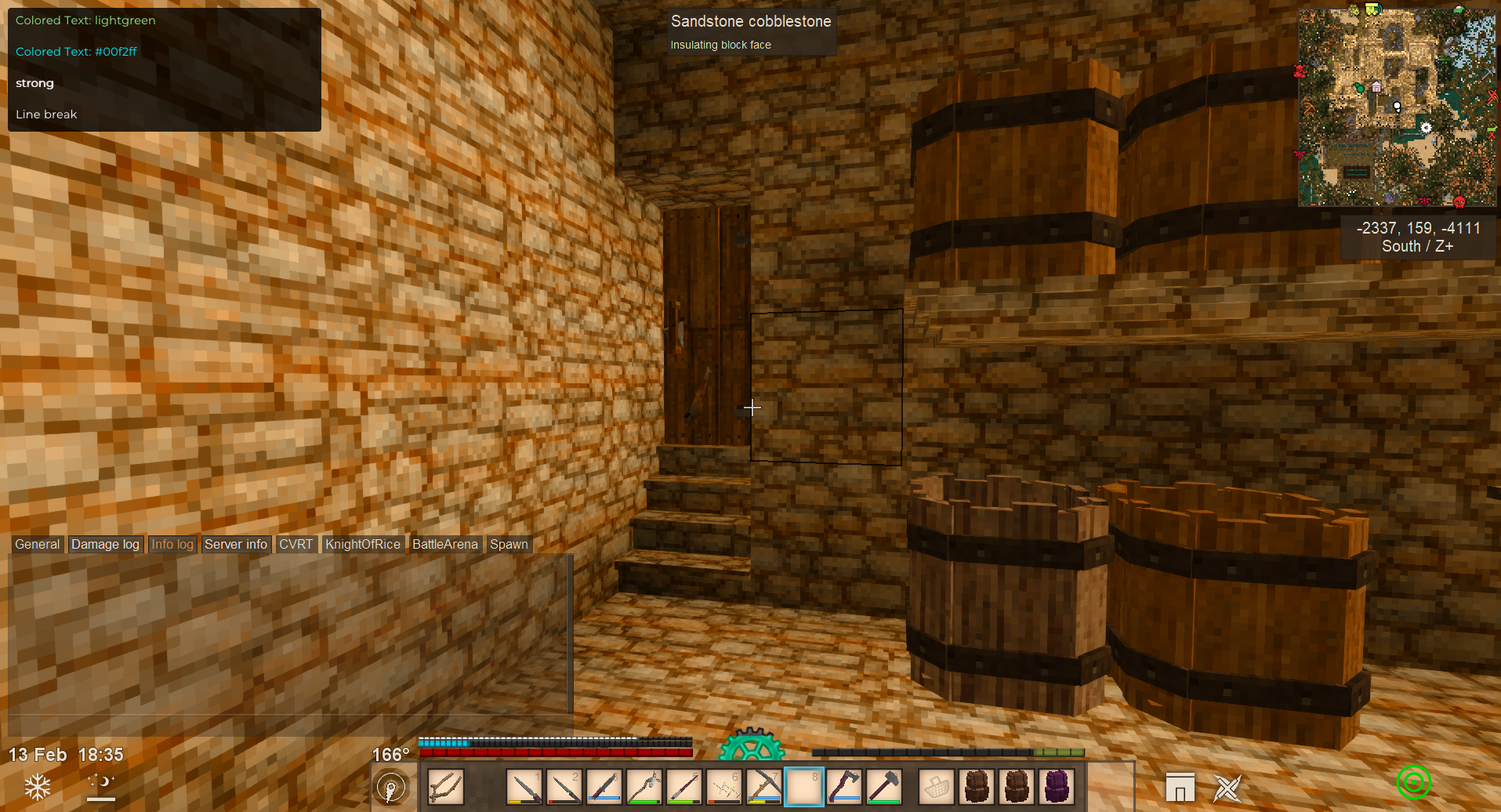
<div style="height: auto; width: auto; margin: auto; padding: 20px; background: linear-gradient(to top, #0d1117 90%, #0d111700 99%); color: #dde2e7; font-family: 'Segoe UI'; line-height: 1.6;"><div style="max-width: 1650px; margin: 200px auto auto auto;"><div style="border: 1px solid #3d444d; border-radius: 5px; background: #0d1117; overflow: hidden;"><div style="background: #151b23; padding: 5px; border-bottom: 1px solid #3d444d; font-weight: 600; font-size: 22px; text-align: center;">Description</div> <div style="padding: 20px 60px; margin: auto; text-align: center;"> <p><strong>ToastLib is a library leveraging the ImGui implementation by Maltiez to draw toast style popups.</strong> <br><br><em>This mod will not really do anything by itself, other mods should use this to have any messages show outside of chat.</em> <br><br>The reason I made this was because a few players on my server complained about how annoying some mods are with spamming the game chat. One of my own mods was even worse and swapped to the info channel to keep messages out of the general chat, but that ended up being even more annoying having to manually switch chat channels again.</p> </div> </div> <div style="margin-top: 20px; border: 1px solid #3d444d; border-radius: 5px; background: #0d1117; overflow: hidden;"> <div style="background: #151b23; padding: 5px; border-bottom: 1px solid #3d444d; font-weight: 600; font-size: 22px; text-align: center;">Requirements</div> <div style="padding: 20px 60px; margin: auto;"> <ul> <li><a style="color: #608cbe;" href="https://mods.vintagestory.at/imgui">ImGui</a></li> </ul> </div> </div> <div style="margin-top: 20px; border: 1px solid #3d444d; border-radius: 5px; background: #0d1117; overflow: hidden;"> <div style="background: #151b23; padding: 5px; border-bottom: 1px solid #3d444d; font-weight: 600; font-size: 22px; text-align: center;">Features</div> <div style="padding: 20px 60px; margin: auto;"> <ul> <li><strong>Toast Notifications</strong> — Display customizable toast notifications on the screen.</li> <li><strong>Configurable Styles</strong> — Easily change the appearance of the toast notifications by using the <code>ShowToastAdv()</code> method.</li> <li><strong>Smooth Animations</strong> — Smooth slide-in and slide-out animations for the toast notifications.</li> <li><strong>Minimal VTML Support</strong> — Support for a limited subset of VTML, allowing for basic markup and styling.</li> <li><strong>Easy To Use</strong> — Send toast notifications in nearly the same format as the vanilla <code>SendMessage()</code> method.</li> </ul> </div> </div> <div style="margin-top: 20px; border: 1px solid #3d444d; border-radius: 5px; background: #0d1117; overflow: hidden;"> <div style="background: #151b23; padding: 5px; border-bottom: 1px solid #3d444d; font-weight: 600; font-size: 22px; text-align: center;">Supported VTML Tags</div> <div style="padding: 20px 60px; margin: auto;"> <table style="border-collapse: collapse; width: 100%; height: 120px; margin-left: auto; margin-right: auto; color: #dde2e7;" border="1"> <tbody> <tr style="height: 50px;"> <td style="width: 25%; height: 20px; text-align: center; font-size: 18px;"><strong>Tag </strong></td> <td style="width: 25%; height: 20px; text-align: center; font-size: 18px;"><strong>Description </strong></td> <td style="width: 25%; height: 20px; text-align: center; font-size: 18px;"><strong>Example </strong></td> <td style="width: 25%; height: 20px; text-align: center; font-size: 18px;"><strong>Result </strong></td> </tr> <tr style="height: 20px;"> <td style="width: 25%; height: 20px; text-align: center; color: #acacac;"><code><font color=" "></code></td> <td style="width: 25%; height: 20px; text-align: center; color: #acacac;">Sets text color</td> <td style="width: 25%; height: 20px; text-align: center; color: #acacac; font-size: 12px;"><code><font color="lightcoral">Alert</font></code></td> <td style="width: 25%; height: 20px; text-align: center; color: #dde2e7;"><span style="color: #f08080;">Alert</span></td> </tr> <tr style="height: 20px;"> <td style="width: 25%; height: 20px; text-align: center; color: #acacac;"><code><font color=" "></code></td> <td style="width: 25%; height: 20px; text-align: center; color: #acacac;">Sets text color</td> <td style="width: 25%; height: 20px; text-align: center; color: #acacac; font-size: 12px;"><code><font color="#00F2FF">Info</font></code></td> <td style="width: 25%; height: 20px; text-align: center; color: #dde2e7;"><span style="color: #00f2ff;">Info</span></td> </tr> <tr style="height: 20px;"> <td style="width: 25%; height: 20px; text-align: center; color: #acacac;"><code><font weight="bold"></code></td> <td style="width: 25%; height: 20px; text-align: center; color: #acacac;">Makes text bold</td> <td style="width: 25%; height: 20px; text-align: center; color: #acacac; font-size: 12px;"><code><font weight="bold">Important</font></code></td> <td style="width: 25%; height: 20px; text-align: center; color: #dde2e7;"><strong>Important</strong></td> </tr> <tr style="height: 20px;"> <td style="width: 25%; height: 20px; text-align: center; color: #acacac;"><code><strong></code></td> <td style="width: 25%; height: 20px; text-align: center; color: #acacac;">Alias for bold text</td> <td style="width: 25%; height: 20px; text-align: center; color: #acacac; font-size: 12px;"><code><strong>Warning</strong></code></td> <td style="width: 25%; height: 20px; text-align: center; color: #dde2e7;"><strong>Warning</strong></td> </tr> <tr style="height: 20px;"> <td style="width: 25%; height: 20px; text-align: center; color: #acacac;"><code><br></code></td> <td style="width: 25%; height: 20px; text-align: center; color: #acacac;">Inserts a line break</td> <td style="width: 25%; height: 20px; text-align: center; color: #acacac; font-size: 12px;"><code>Line 1<br>Line 2</code></td> <td style="width: 25%; height: 20px; text-align: center; co
Ratings & reviews
Sign in to leave a rating or comment.



