About VintageTweaks
From Vintage Story ModDBVintageTweaks! A collection of small quality of life tweaks I would like to see in Vintage Story.
Tweaks and changes I thought would be nice to see in Vintage Story. All fully optional in the config, so you can turn off anything you don’t like. More features will be implemented as I come across new ideas!
If you'd like to check out more quality of life changes check out my other mod BetterNails!
Current Features:
-
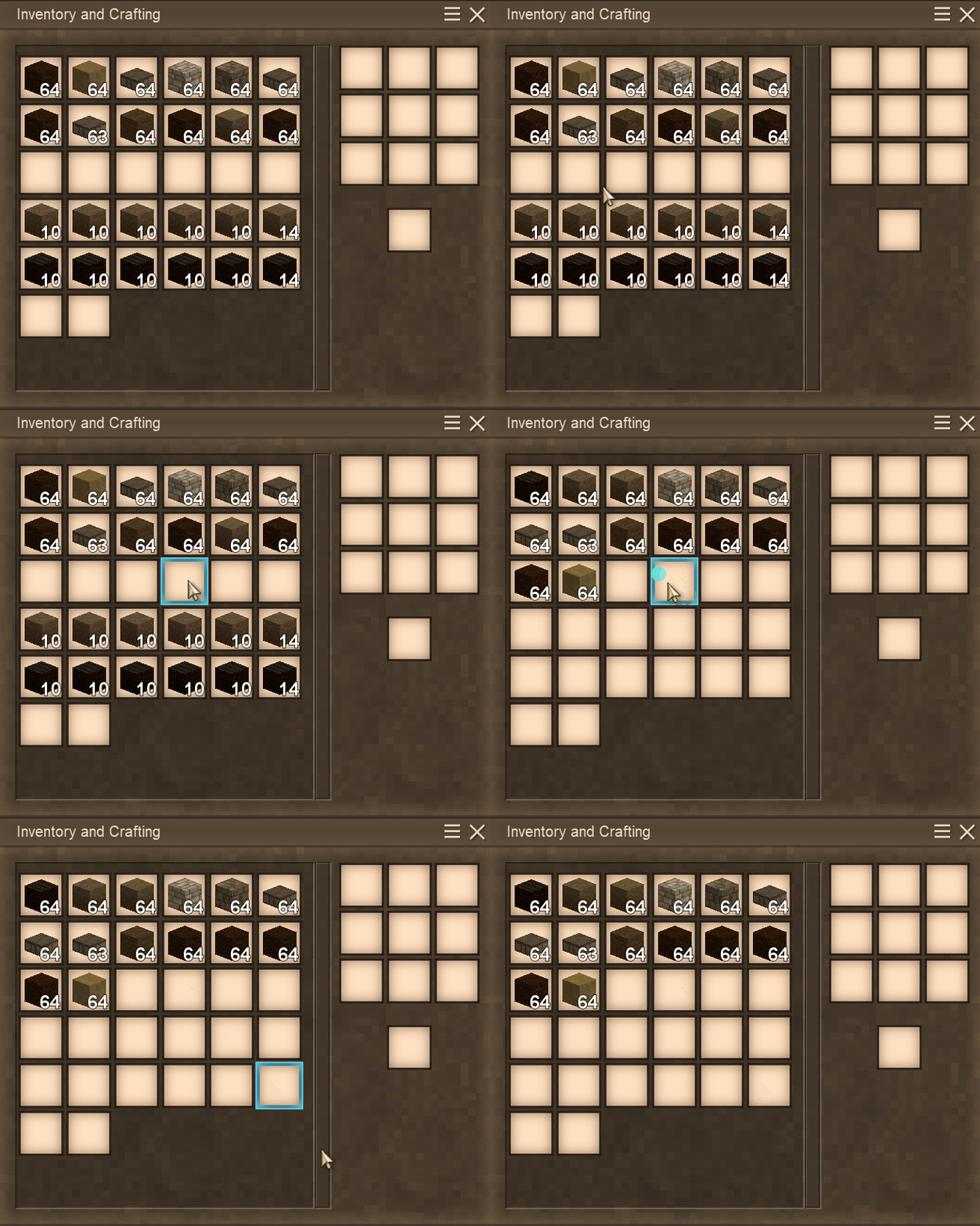
Middle Click Sort
- Middle click any item slot in your own backpack or a placed inventory.
- Items will be stacked and sorted within the clicked slot group.
-
Quick Move Items
- Shift + Left Click on an item slot twice (in quick succession).
- All items of that kind will be moved into the desired inventory.
-
Drag to Move Items
- Hold Shift + Left Click on any item slot, then drag your mouse over item slots.
- All items hovered will be moved into the desired inventory.
-
Leave One
- Right Click while holding an item in your mouse, then drag it over any empty slots.
- A single item will be left in each empty slot, or added to the stack.
-
Quick Crates
- Sneak + Right Click on a crate twice (in quick succession).
- Moves all items that match the crate into the crate.
- Sprint + Right Click on a crate twice (in quick succession).
- Removes all of the items from the crate, stopping when the inventory is full.
- Sneak + Right Click on a crate twice (in quick succession).
-
Quick Piles
- Sneak + Right Click on a pile twice (in quick succession).
- Moves all items that match the pile into the pile.
- Sprint + Right Click on a pile twice (in quick succession).
- Removes all of the items from the pile, stopping when the inventory is full.
- Sneak + Right Click on a pile twice (in quick succession).
-
- Works with stacking, messy ground storage, and coal or charcoal piles.
- Coal and charcoal will only quick stack up to four stable layers. Normal stacking can still go higher.
-
Waypoint Sharing (use /waypoint list to find the ID)
- /wpshare <player> <waypointid|all>
- Shares a specific waypoint, or all eligible waypoints.
- /wpaccept <player> <waypointid|all>
- Accepts a specific share request, or all pending requests from that player.
- If the waypoint already exists at the same position, another one will not be created.
- /wpdeny <player> <waypointid|all>
- Denies a specific share request, or all pending requests from that player.
- /wpshare <player> <waypointid|all>
-
Clear Crafting Grid (idea credit: Timbrage)
- Middle click on the output slot of your crafting grid.
- All items within the crafting grid will be moved to your inventory.
-
Clear Hands (idea credit: Raathur)
- Shift + F with an item in your hand (customizable).
- The item will be moved into your inventory.
-
Swap Offhand (idea credit: AndyAndY)
- Shift + Flip Hand Slot while hovering over an item slot.
- Your offhand will be swapped with the item in the slot.
-
Squinting Zoom
- A slight zoom that is meant to imitate squinting, fully customizable.
- Smoothly zooms in while held and returns to normal when released.
COMPATIBILITY NOTE: Any mod that adds a custom inventory may cause item loss. This issue has been addressed but i'll keep the note so there aren't any surprises.
Highlights
From source dataGame versions
Built for Vintage Story 1.20.12.
Footprint
Rated a light load on a server.
VintageTweaks on Nxeon
From our catalogue- One-click install
- Supported on Nxeon Vintage Story servers. We download it from Vintage Story ModDB, place it, and restart the server.
- Server side
- Required on the server
- Server load
- light
- Smallest plan we suggest
- Vintage Story — 1 GB (1 GB RAM). This follows our own load rating above, not a benchmark.
Run VintageTweaks on a Vintage Story server
Pick a server or deploy a new one above; it is installed in one click.
What kind of mod it is
From the catalogQuality of life & UI
Small conveniences, tweaks and interface improvements players notice straight away.
Runs on your server
From source side supportVintage Story ModDB lists VintageTweaks as required on the server. Check its Vintage Story ModDB page to see whether players need it too.
Compatibility
- Game
- Vintage Story
- Runs on
- Serverrequired on the server
- Game versions
- 1.20.12
Verified at the source
- ✓Vintage Story ModDBOfficial listing, checked 2026-09-24Open ↗
- ✓Authorspiker51, as published on Vintage Story ModDB
- ✓LicenseNot published by the sourceFree