

Vintage Story Content Creator Integration
The purpose of this mod is to allow interactions with streaming platforms and VS
Description
The purpose of this mod is to allow interactions with twitch (and maybe other platforms in the future) chat and your vintage story world
<span style="text-decoration: line-through;">There is a lot planned for this mod but currently it only supports printing events to chat.</span>
To setup you just need to open the config window using the client command ".vscci config"
once thats open you can click on "Login/Connect" to connect your twitch account to vscci. You must use the account you are streaming from. If you want to receive bit / point redemption events you must be either a twitch affiliate or partner. Otherwise you will receive only events like raids, follows and subscriptions.
Once that happens all events are being received
After you are logged in you should see your twtich username and ID in the config window and a status of "Connected"
If you want to disconnect at any time you can press the disconnect button. To re-connect, just click the login button again, Since you are already logged in it will just connect you.
Twitch connections all happen client side, so as many people as want to can be connected to twitch and have evnts run.
If you need help setting up or using vscci check out https://github.com/blakdragan7/vscci/wiki for some information on how to use and setup vscci.
Import / Export
To import an event graph, run the command .vscci import path_to_file from the chat window
To export an event graph, run the command .vscci export path_to_file from the chat window
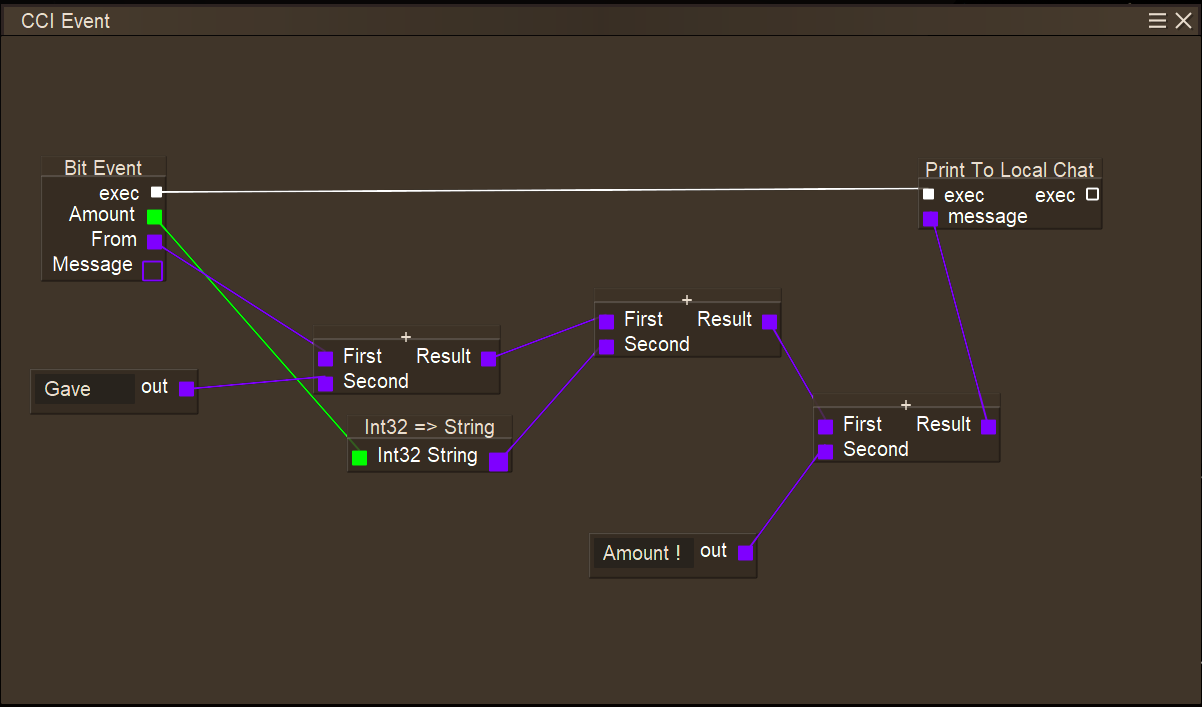
Visual Scripting Language
The scripting language's first iteration is out ! There is some bare bones documentation available at https://github.com/blakdragan7/vscci/wiki/VSCCI-VSL-Tutorial and a video tutorial is available here and a video explaining the 0.3.0 update here There is a video explaining the 1.0 update here
You can open the script editor with the command ".vscci event"
A whitelist (the same whitelist as before) is used to determine who is allowed to execute server side nodes (currently only the run server command node), However; all client side executable nodes are still allowed even without server permission (This was decided because they only affect the user and no one else on the server).
The white list will be under {VintageStoryData install folder}/ModConfig/vscci.json and is just a comma seperated list of usernames inside strings like this
{ "Whitelist": [
"blakdragan7",
"SomeOtherUser123" ]}.
It will require a server restart to pick up any changes made to this file
Streamlabs
Streamlabs is now supported !
Streamlabs support includes:
- Twitch Events
- Follow
- subscription
- host
- bits
- raid
- Youtube Events
- subscription
- sponser
- super chat
- Mixer Events
- supscription
- follow
- host
- Stream Lab Events
- donation
- loayalty point redemption
Setting up streamlabs is easy. First, make sure the Dropdown next to Stream Platform Type is set to "Streamlabs", Then, Just copy your socket api token from https://streamlabs.com/dashboard#/settings/api-settings under Api Tokens and paste it into the text box next to "Stream Platform Key" Then press Connect Platform. It will now connect you to streamlabs and every startup after will auto connect just like twitch.
StreamElements
Streamelements supports basically everything streamlabs does. To setup streamelements First, make sure the Dropdown next to Stream Platform Type is set to "Streamelements". Then, you need the JWT token that you can find by following the cci for minecraft documentation here https://content-creator-integration.readthedocs.io/en/latest/gettingstarted/socketkey/streamelements/ Paste that token into the text box next to "Stream Platform Key" Then press Connect Platform. It will now connect you to Streamelements and every startup after will auto connect just like twitch.
Stuff To Be Aware Of:
<span style="text-decoration: line-through;">If both streamlabs and twitch are connected then you will get double events. This will be handle properly in the future.</span>
This is already fixed
<span style="text-decoration: line-through;">With that being said, all twitch information is stored server side, so that you don't have to log in every time you open the game. No login information is stored, only an OAuth token. but I would only log in when the owner of the server is someone you trust (that goes for both dedicated and non dedicated servers) just in case. If you find yourself in a situation where you beleive your account could be compromised you can disconnect the vscci connection from your account and that will invalidate all information assosiated with vscci. That should never happen but it is important to be aware of just in case.</span>
Ratings & reviews
Sign in to leave a rating or comment.



